For founders, solopreneurs and small teams, LinkedIn is often the first place a client, investor or hire meets you. The profile photo does a lot of that work, and booking a photographer for every new hire or role change is slow and expensive. AI headshot generators promise a professional photo in minutes from a few selfies. The people who have used them, though, keep arriving at the same counter-intuitive rule: the best LinkedIn headshot is not the most polished one. It is the most natural one, judged at the tiny size where people actually see it.
This guide covers what to judge, how to compare generators fairly, what the main tools offer on paper, the privacy questions to ask before you upload your face, and how to pick the one image that earns clicks, connections and replies.
Quick answer: what makes the best LinkedIn headshot generator
Judge any generator on three things, in this order:
- Likeness at thumbnail size. On LinkedIn your photo appears as a small circle next to comments, messages and search results. If the face is not instantly recognisable there, nothing else matters.
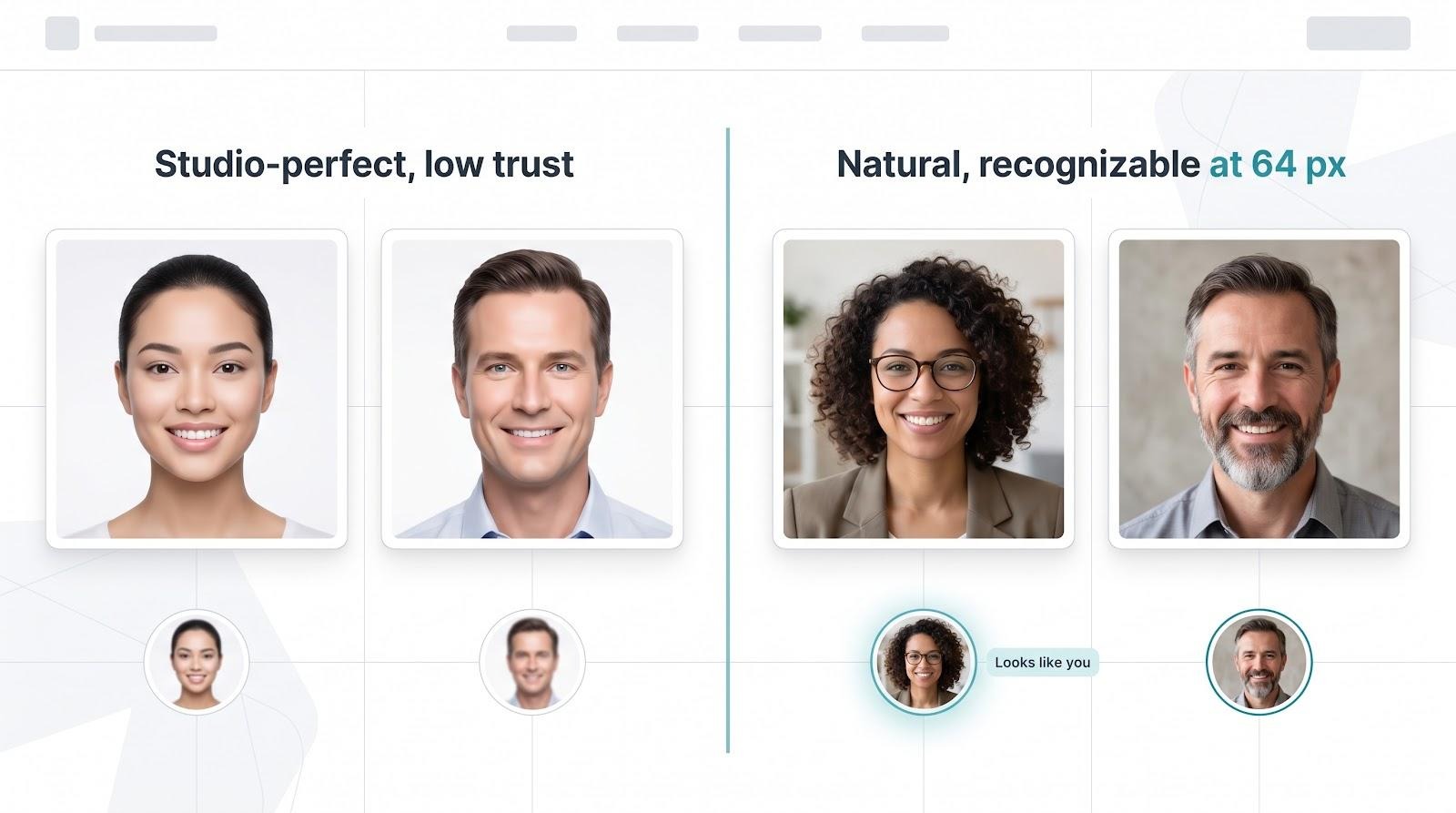
- Natural over perfect. Smooth, flawless skin and a magazine-cover look may impress at full size, but they read as artificial in a feed and fall apart the moment someone meets you on a video call.
- Low risk while you test. You will probably need a few attempts to get a keeper, so a tool that lets you see the results before you pay removes most of the risk.
Short on time? Scan the "Best for" column below to jump to the tool that matches your goal.

*Entry prices and turnaround times as listed by each vendor at the time of writing. Check each site for current rates.
†Aragon lists no exact minimum; 6–8 photos appears in its support docs.
How to compare generators fairly
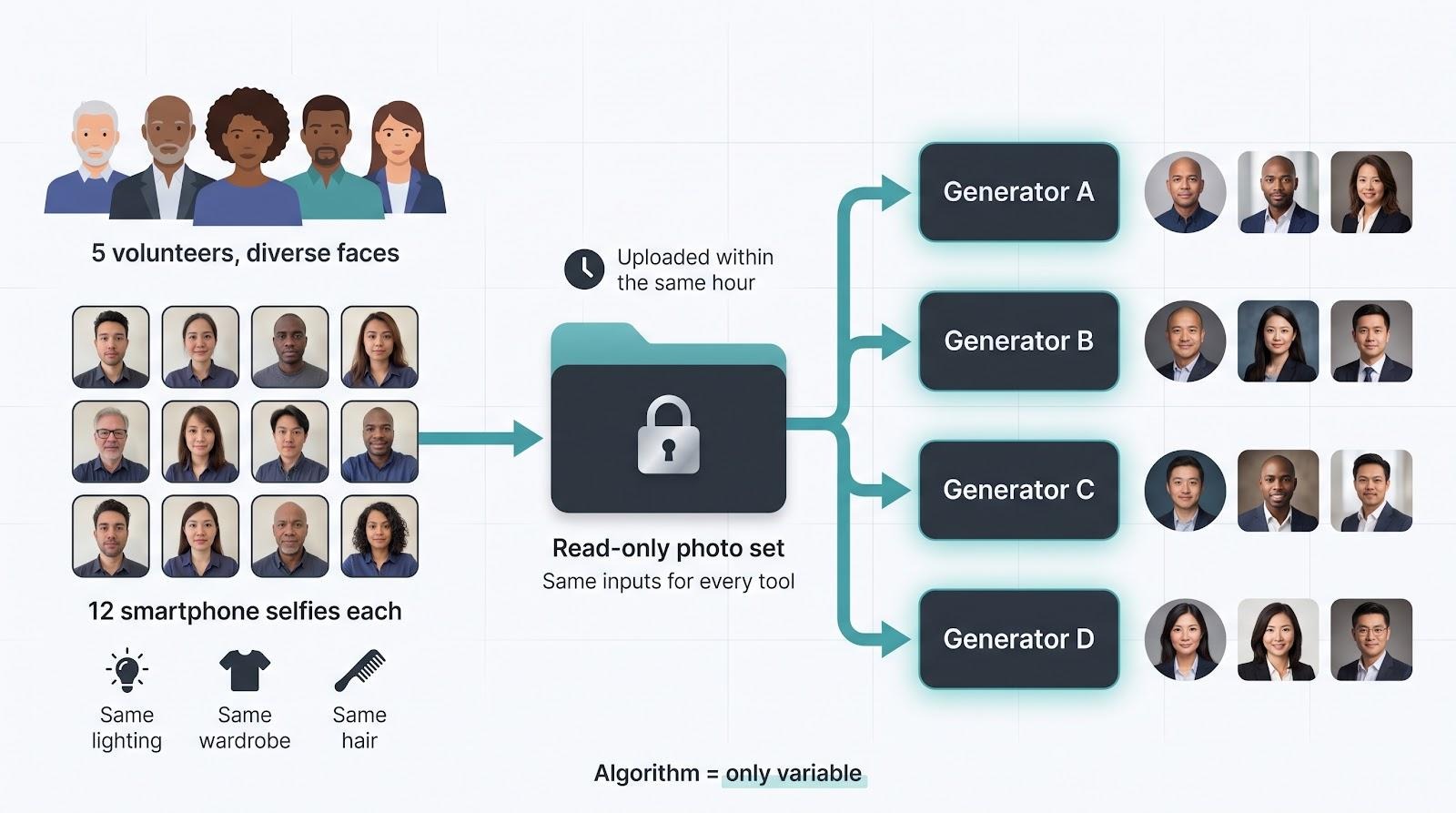
The same-photo rule
If you try more than one generator, give every tool the same photo set. That is the only way to know whether a difference in likeness or skin texture comes from the tool or from your selfies.
- Take all your photos in one session, in good light, with no filters or portrait-mode blur.
- Vary angles, backgrounds and expressions within that set, but keep hair and glasses as you normally wear them.
- If a tool claims a one-photo workflow, it is still worth noting how it handles your best single shot compared with tools that take a full set.
- If you are choosing for a team, include a few people with different skin tones, ages and eyewear, with their consent. A tool that works well on one face can drift on another.
By holding the inputs constant, any shift in natural skin texture, keeper count or likeness belongs to the algorithm, not the selfies. That is the fairest way to learn which generator really knows your face.
What to score
Keep it simple: recognisability at thumbnail size first, then natural skin texture, then speed, price and privacy terms. A tool that is fast and cheap but does not look like you is not a bargain.
What LinkedIn asks of your photo
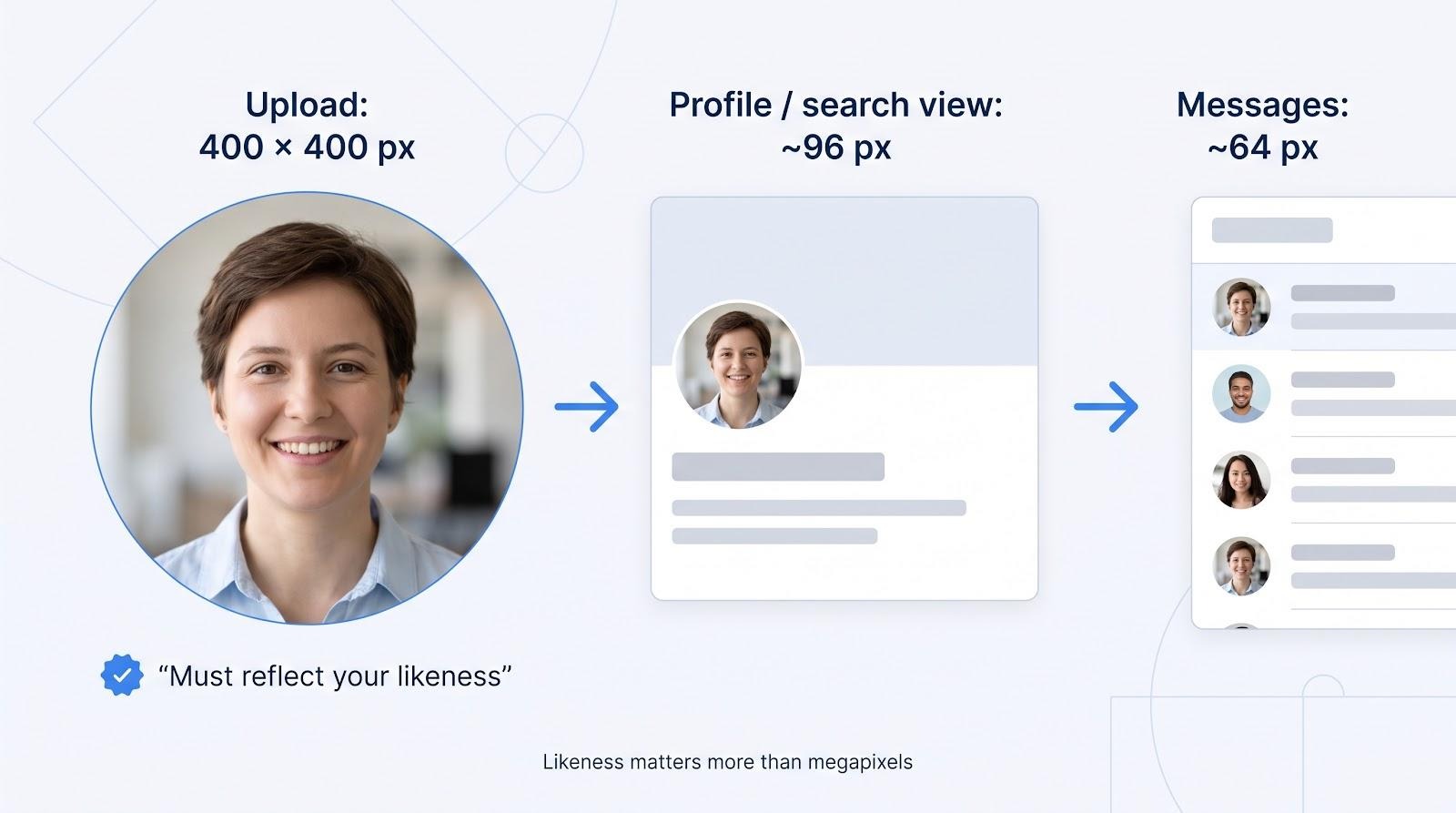
LinkedIn's own LinkedIn photo guidelines ask for a photo that represents you. In practice, that means your real face, current and recognisable, without anything that hides or distorts it. An AI headshot can meet that bar as long as it still looks like you. The problems start when a tool "improves" your face so much that it no longer does: a changed jawline, a different eye colour, or a decade of lines erased.
Why protect likeness? Faces drive clicks. LinkedIn has long encouraged members to add a profile photo because profiles with a photo get far more attention than the default silhouette. For a founder or solopreneur, those views can turn into client enquiries, investor conversations and partnership invites.
So when we say natural beats studio-perfect, we are following LinkedIn's own logic. Fine detail matters on a billboard; recognisability in a small circle is what moves the networking needle here. No likeness, no value.
Why natural beats studio-perfect at LinkedIn size
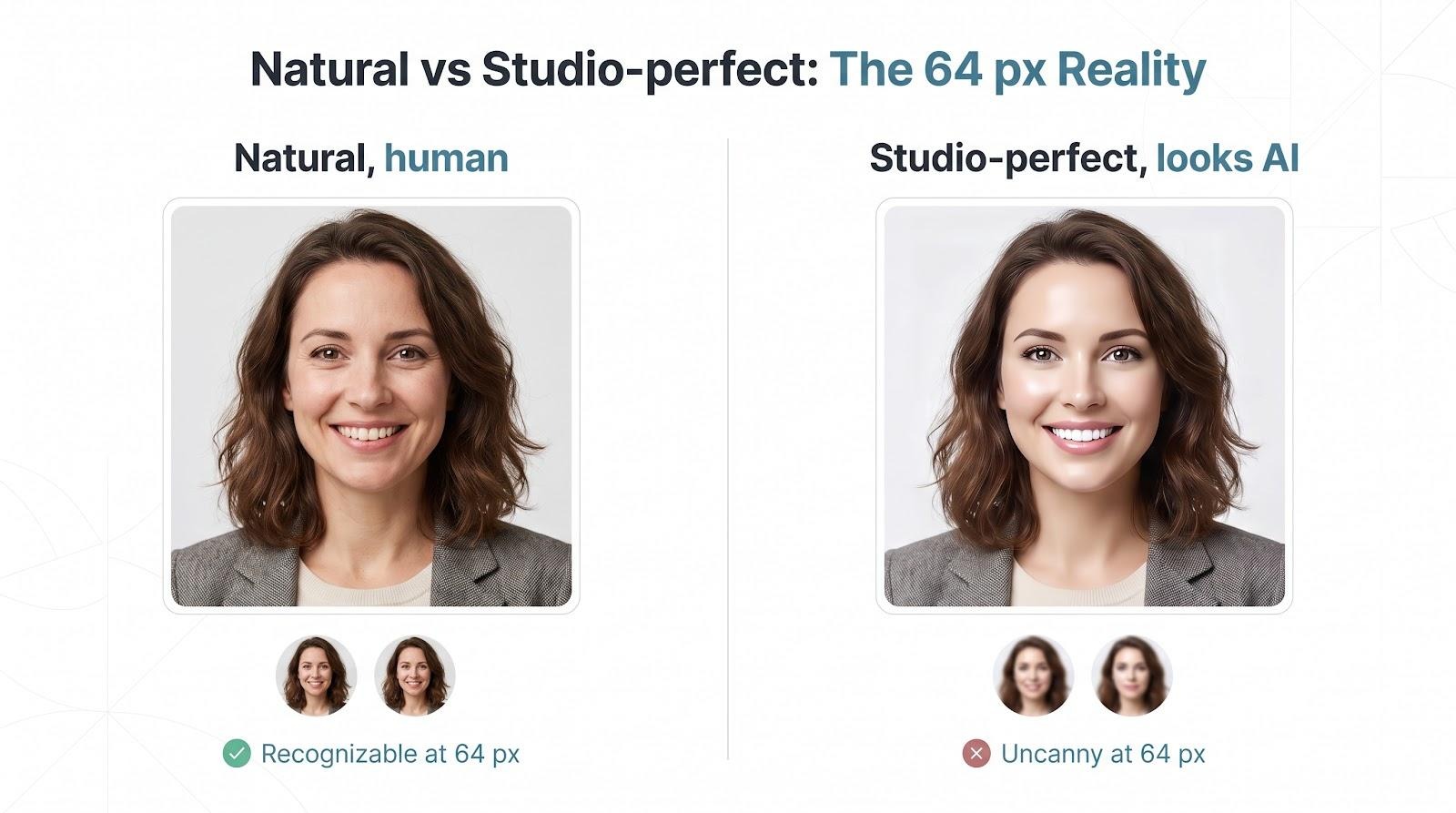
At full size, a heavily retouched AI portrait can look striking. Shrunk to a small circle, the same image often looks waxy and generic, because the details that make a face recognisable, such as skin texture, the exact shape of the eyes and the way your hair falls, have been smoothed away. At that scale, viewers notice two things: your silhouette and whether you look real. Pores do not need to sparkle, but a believable smile and a familiar eyebrow arch do.
Over-polished images can work against you. Porcelain skin, ultra-white teeth and identical catch-lights signal "AI avatar", which prompts people to wonder whether the person behind the pixels is real. A slightly less polished photo with real texture usually reads as more trustworthy, both to people scrolling past and to anyone who meets you on a call.
That is why the best approach is to generate a full batch and then deliberately choose the natural shot, not the most glamorous one.
The quick test is simple: open a finalist headshot, crop it to a circle, shrink it to around 64 pixels, and ask a colleague, "Could you pick me out on a video call after seeing this?" If the answer is yes, the photo works even if the lighting is not cinematic. If it is no, no amount of 4K resolution will save it.
The generators, one by one
1. Magic Studio: a generator built for "see it before you pay"
Magic Studio is built around the "see it before you commit" approach that suits LinkedIn photos. You upload about 10 selfies with different backgrounds, face angles and lighting, and it trains a private model for your shoot. That variety of input is what keeps likeness high. It returns a set of 50 headshots in five looks, ready in 15 to 60 minutes depending on the pack, and you only pay if you love the results and want to keep them. For founders who want a best LinkedIn headshot generator without the risk of paying for a batch that misses, that is the deciding feature.
Why it works
- The try-first flow removes the fear of paying for AI mistakes: you preview your first 50 photos (watermarked) before you pay.
- Pricing is clear. The Starter pack is $59 for 50 headshots in 5 looks, with Basic and Premium packs above it, and all are one-time purchases rather than subscriptions.
- The marketing says results can be ready in 15 minutes; the FAQ says Starter usually takes about an hour, and Basic and Premium are faster.
- If you do not get at least four decent headshots and have not downloaded any, it refunds your payment when you ask within three days.
What to keep in mind
- Background and outfit changes cost extra.
- Standard files are 1024 × 1024 pixels, which is plenty for LinkedIn. You can upscale to 4K for a fee or credits, and the Premium pack gives 4096-pixel images.
- Your photos are used only for your own shoot, not for any other training, and data is deleted automatically 30 days after your headshots are created. You can delete it any time before that.
For small teams. If you are hiring, Magic Studio's Teams product lets an admin invite members by email or create headshots on their behalf, and set backdrops and outfits once so everyone gets one consistent look. You pay after you like what you see, and per-person pricing is lower than individual pricing, with bigger discounts for larger teams.
Bottom line: if paying before approval feels risky, Magic Studio gives you a safety net built on previews, clear pricing and a written refund rule.
2. HeadshotPro: for teams, security and integrations
HeadshotPro is built for companies with a folder of mismatched selfies. Invite colleagues to a shared dashboard; each person uploads about 15 casual shots, and the platform trains a private model for every user. The $29 Basic pack delivers 30 images in about two hours, while higher tiers cut that to roughly 30 and 15 minutes.
Control highlights
- Admins can lock backgrounds, enforce uniform crops, bulk-download ZIPs, or send finished portraits into HR systems through an API, Zapier or SSO.
- For no-code builders, the API and Zapier options mean headshots can flow into a team page or internal database without manual uploads.
Know before you buy
- 4K exports sit behind the top tier.
- Results depend on photo variety; six near-identical selfies will reproduce the same flaws.
For founders, brand managers and startups that need polished "About us" grids without chasing files, HeadshotPro turns remote photo day into a short task.
3. BetterPic: for 4K clarity with a human-edit safety net
If you need one portrait that can move from a LinkedIn circle to a conference banner, BetterPic says it delivers 4K files on every tier. The $35 Basic plan provides 20 high-resolution images, enough for a press kit, typically within about an hour.
Workflow
- Upload eight to ten varied selfies, pick a background style and click Generate.
- If a collar fold or stray hair slips through, you can order a manual retouch for $8 per shot, handled by in-house editors within 24 to 48 hours.
Developers and agencies can use an API or a full white-label deployment to resell the service under their own brand. Teams can bulk-export ZIPs at multiple resolutions.
Privacy note: BetterPic states that source photos and personal models delete automatically, currently 30 days after generation. Historical snapshots once showed 90-day windows, so reconfirm the timeline before uploading sensitive images.
What to watch
- Volume is fixed at 20 images on Basic; for more variety, choose a higher plan.
- Ultra-sharp files will not hide an unnatural smile; run the 64-pixel video-call test before picking your hero shot.
For creators who reuse a headshot across slides, podcasts and printed programmes, BetterPic's 4K output plus affordable human polishing is a strong combination.
4. Dreamwave: a one-photo workflow when you need a shot right now
Dreamwave helps when you have one clear selfie, a looming deadline and no time for a photo shoot. Upload a head-and-shoulders image, click Generate, and about an hour later you can review 40 portraits, with no extra angles required.
Why it works
- One photo is all it asks for, which makes it the lowest-effort option on this list.
- Data stays on U.S. servers and auto-deletes after 30 days of inactivity.
- HR integrations can drop new headshots into org charts.
Watch-outs
- Once generation starts, sales are final; read the terms before you start.
- A one-photo workflow depends entirely on that one photo, so make it sharp and well lit, and delete obvious misses such as blurred lapels or odd edges.
Bottom line: if you have a single good selfie and a ticking clock, Dreamwave is built for that situation.
5. Aragon AI: when speed and style variety top your list
If you want LinkedIn-ready headshots quickly, Aragon AI is built for speed. The $35 Basic plan produces 40 images in about 45 minutes, while the premium tier cuts that to roughly 15 minutes.
Speed and variety
- The editor lets you cycle through backdrops without rerunning the shoot.
- A couple of clicks swap "conference-hall neutral" for "outdoor", which is handy when you need different looks for investor decks, event badges and your website.
Security at a glance
- SOC 2 Type II certification.
- Default deletion of source photos and personal models after 30 days.
- No public-model training.
Trade-offs
- No 4K option; resolution tops out under 2K on the highest tier.
- The core model architecture is proprietary, so risk teams seeking technical white papers may prefer HeadshotPro.
As with any tool, check glasses for glare in dramatic-light presets. With short runtimes, you can generate a second batch the same morning if the first misses.
6. Profile Bakery: a budget preview with strict EU hosting
Need a headshot on a bootstrapped budget? Profile Bakery starts at $24 for 30 photos and lets you preview three low-res samples before you pay. Upload one clear selfie (more are optional for variety) and about 15 minutes later you receive roughly 30 portraits plus ready-made crops for LinkedIn, email signatures and company-directory squares.
Privacy is the headline feature. Processing stays on EU servers, uploads delete automatically after seven days, and generated images are deleted after 30 days, or sooner if you click Delete Now. For anyone navigating GDPR, or simply uneasy about data crossing borders, that regional lock adds confidence.
Trade-offs
- No 4K option or human retouch layer.
- Most public testimonials are vendor-supplied, so independent reviews are limited.
- Check dark backgrounds closely; if they look flat, a quick recrop or a lighter backdrop helps.
For early-stage founders, students or anyone who wants to keep data in the EU, Profile Bakery shows that a trustworthy headshot does not need premium pricing.
7. Secta Labs: when you want an endless remix reel
If you judge value by sheer variety, Secta Labs stands out. Upload 20 to 50 source photos and you receive 200-plus HD portraits in roughly an hour.
The real payoff comes after generation. Tap any thumbnail, use the Remix control, and Secta re-renders the same pose with a new backdrop, brand hex colour or lighting grade, with no retraining needed. It is a quick way to align headshots with campaign palettes or seasonal themes.
Perks and caveats
- A thirty-day money-back guarantee, which is rare in this niche.
- Collecting dozens of varied selfies is real homework for remote teams.
- The docs promise encryption and auto-purge, but exact deletion dates are unclear; compliance-minded teams should request confirmation.
Secta is not for someone who only needs one LinkedIn photo. For social marketers, slide-deck designers or founders who refresh their profile picture every quarter, its volume and remix toolkit are hard to match.
8. The Multiverse AI: nominal value and typed-edit flexibility
If you measure value by the number of images per dollar, The Multiverse AI is worth a look. For $29.99 you get 100-plus headshots plus 20 typed edits: describe a tweak ("forest-green blazer", "sunlit co-working loft") and the system re-renders the frame with no retraining. The stated turnaround is 10 to 15 minutes.
Privacy is unusually transparent. A machine-readable spec states that uploads, personal models and generated images delete 90 days after your last purchase, and you can trigger "Delete now" at any time. That window is longer than HeadshotPro's 30-day cycle but clearer than tools that stay vague.
Trade-offs
- The site recommends 12 to 15 selfies for best likeness.
- Longer cloud storage means you must remember to purge files if your policy or role changes.
- As with any generator, check results on older faces for unwanted de-ageing, and drop any image that makes you look years younger.
Typed editing plus triple-digit volume makes Multiverse a power tool for marketers who refresh profile images every campaign; just set a reminder to clear the archive.
9. AI SuitUp: a published resolution ladder for pixel purists
Some buyers need exact pixel math. AI SuitUp publishes a clear resolution ladder: 768 × 768 px for $27, 1024 × 1024 px for $37, and 2048 × 2048 px for $57.
You will need at least 16 selfies; SuitUp says more angles secure likeness. Official pages list turnaround from six hours on Basic to one hour on Premium.
SuitUp runs the FLUX image model and stores uploads plus the trained model for 30 days before automatic deletion, hosted on AWS to align with GDPR norms.
Trade-offs
- A heavier input burden than rivals; remote teams may struggle to gather 16 usable shots.
- Trustpilot shows a strong rating, but independent galleries remain limited.
- If you need results in minutes, faster tools on this list will suit you better.
Designers who must guarantee print-ready pixels will value SuitUp's published specs; just allow extra time for uploads and processing.
10. ProPhotos: when you need a large batch in one pass
High-volume users such as actors, keynote speakers or real-estate professionals will appreciate ProPhotos for its generous image counts. The $39 Starter plan delivers 40 headshots, while upper tiers scale to 100 and 200 images.
Upload as many varied selfies as you like, choose wardrobe and background presets, and wait. Official copy lists about 90 minutes on Starter, 45 on Pro and 30 on Elite.
What stands out
- A wardrobe matrix previews business-casual, full-suit or creative-jacket looks side by side.
- Thirty-day auto-deletion of source photos and personal models; the company says it never trains public models with client data.
- Mix-and-match exports let you fill LinkedIn, a personal site and speaker one-sheets without extra retouch fees.
Points to check
- No SOC 2 or ISO certifications, so compliance-minded teams may request a DPA.
- The exact pixel count is not public; ask for it if you need banners or print.
ProPhotos offers more variety than most people need for a single LinkedIn refresh, but it suits professionals who rotate profile shots seasonally or manage several personal brands.
11. PortraitPal: a same-day, no-frills package
PortraitPal keeps things simple: upload 5 to 10 selfies, pay a flat fee, and receive finished headshots later the same day. Its pricing page lists three plans: Starter $35 for 20 images (about 3 hours), Basic $45 for 60 images (about 2 hours), and Premium $75 for 100 images (about 30 minutes).
Workflow
- Choose a background theme and skim the short style guide.
- Click Generate and come back later the same day.
As with any tool, look out for beauty-filter skin and soft collars, which you can often fix with a quick crop or by choosing another image.
Privacy and security
- Source photos delete automatically after 30 days; generated images stay until you remove them.
- No SOC 2 or ISO certifications, so regulated industries should request additional documentation.
A good fit for freelancers, solopreneurs and anyone who needs a one-off LinkedIn photo without learning a dashboard or juggling subscriptions. Upload, pay and download.
Watch-outs
- No stated 4K option; ask support if you need print-level resolution.
- Limited technical transparency compared with HeadshotPro.
12. Try It On AI: a three-minute, on-the-go shoot
Speed is the headline here. Upload one close-up selfie, and about three minutes later a gallery appears. Because the system enhances rather than trains a personal model, you trade breadth for speed: expect 10 to 15 images at roughly 1200 × 1200 px, enough for LinkedIn but light for print.
Features at a glance
- A browser editor lets you adjust brightness, crop a perfect circle or erase a stray hair, with no Photoshop required.
- Pricing starts at $17 per shoot with no subscription upsell.
Limits to know
- The privacy docs list no retention timeline, so treat this as a consumer convenience tool rather than a compliance solution.
- Style variety is modest compared with Dreamwave or Secta; you gain speed but lose range.
If a client asks for your photo while you are boarding a flight, Try It On AI can deliver a usable headshot quickly, but anyone needing print resolution or strict data terms should look elsewhere.
Which generator fits your situation?
Use the scenarios below as shortcuts back to the list:

Privacy checklist before you upload your face
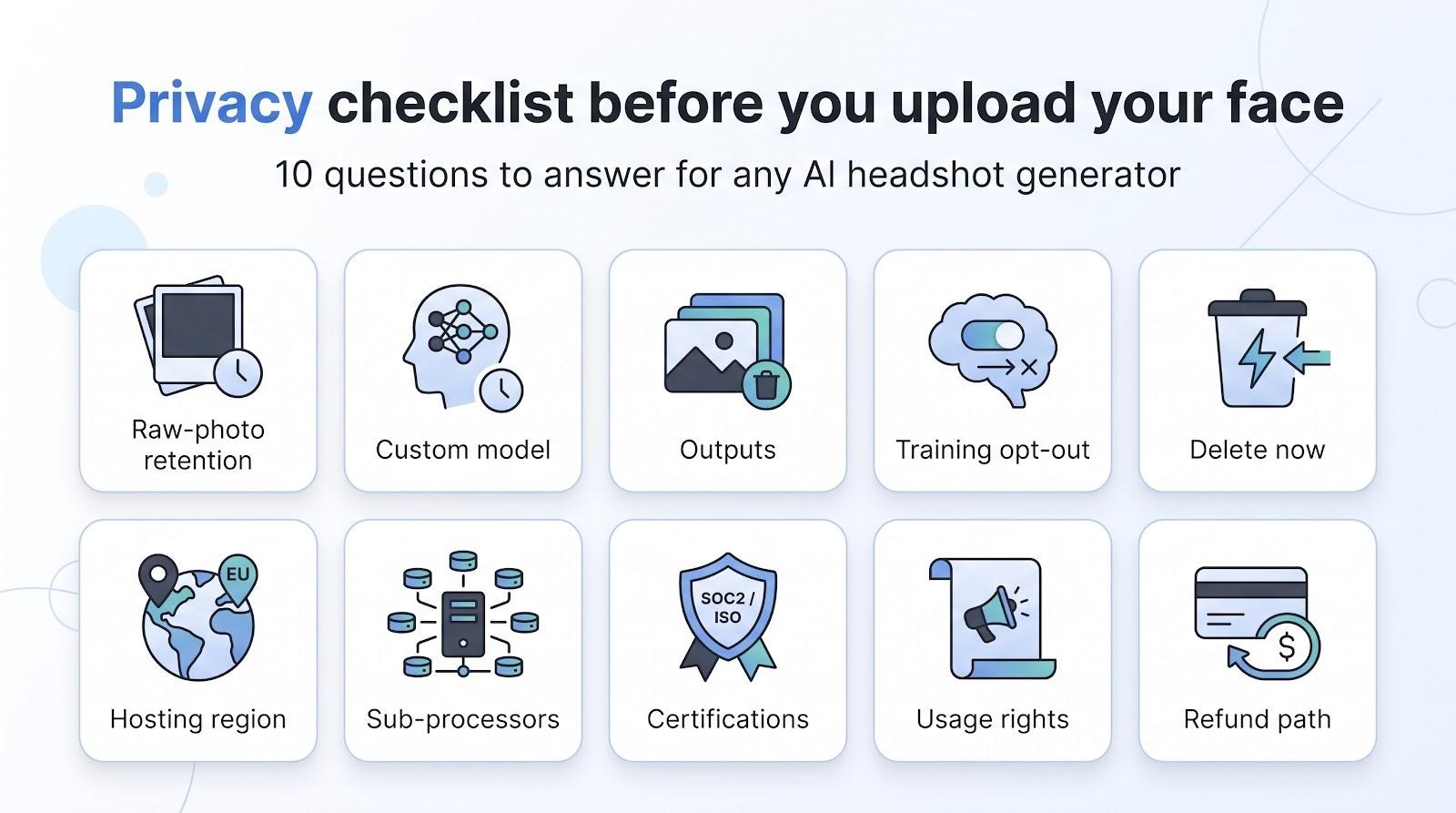
A selfie becomes biometric data the moment you upload it. Many generators promise "GDPR-ready" or "bank-level security", yet policies vary widely. Before you use any generator, and especially before you roll one out to a team, run through this ten-point check. It reflects the kinds of questions raised in the FTC's 2023 policy statement on biometric information.
- Raw-photo retention. How long are your selfies stored: 7 days, 30 days, or indefinitely?
- Custom-model retention. If the service trains a personal model, when is it deleted?
- Output retention. Do finished images auto-delete on a schedule, or stay in the cloud?
- Training use. Are your photos used only for your shoot, or to train the service's general models? If the policy is vague, assume the worst.
- Immediate deletion. Is there a clear "Delete now" button, or must you email support?
- Hosting region. U.S., EU or "global"? Cross-border transfers can break client contracts.
- Sub-processors. Which third parties handle your data?
- Certifications. Look for SOC 2 Type II, ISO 27001 or at minimum a signed agreement that matches your own data-processing addendum and internal policies.
- Commercial rights. Are you allowed to use the results on company pages, in pitch decks and in marketing, or only on social profiles?
- Team consent and refunds. If you order headshots for staff, get each person's consent and give them the option of a traditional photo. And if the terms change, can you reclaim both your money and your data?
If any of the first five fail, shop elsewhere. Your face unlocks your phone and your future; protect it accordingly.
How to choose the keeper from a full batch
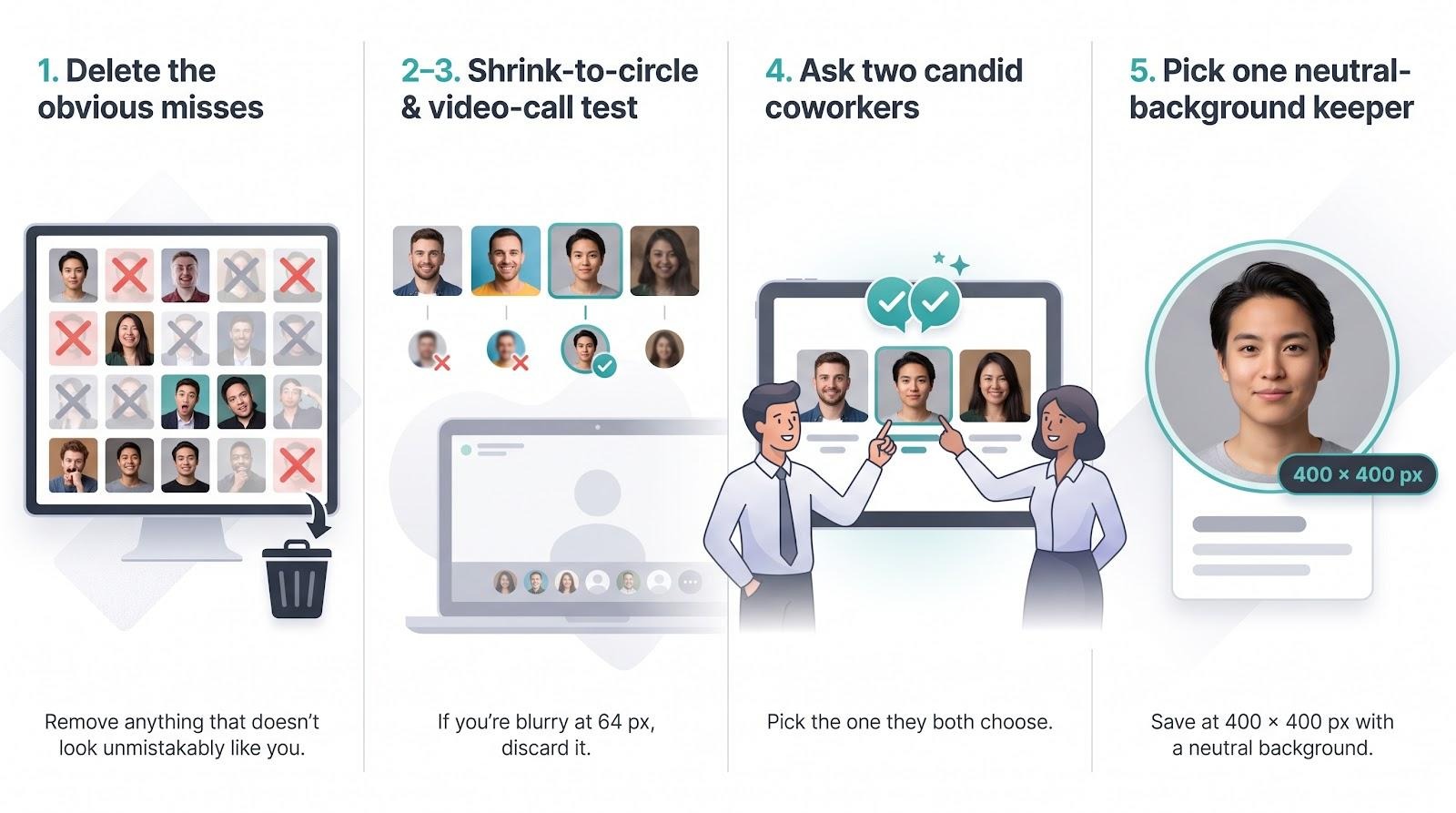
A batch of 50 photos is only useful if you pick the right one. Use this five-step cull:
- First pass at full size. Discard anything that does not look unmistakably like you, and anything with odd eyes, warped glasses, strange hands or blurred edges.
- The circle test. Crop the remaining shots to a circle and shrink them to LinkedIn's small circle size, around 64 pixels. Keep only those where you are instantly recognisable and where your eyes and hair still separate clearly from the background.
- The video-call test. Ask: would someone who meets you on a call tomorrow know this is you within a second? If there is any doubt, drop it.
- The colleague check. Show three to five finalists to one or two people who know you well, without saying which you prefer, and pick the one they agree on.
- Match your brand. From what is left, choose the background and outfit that fit your role and company. A soft grey or muted colour usually beats a busy office and works in both light and dark LinkedIn themes.
Save your winner as a good-quality square file, and keep a backup copy for your website, pitch deck and other profiles, so your face is consistent everywhere people find you.
When a real photographer still wins
AI generators handle most everyday shots, yet some projects still reward a human behind the camera. Magazine covers, billboard campaigns and casting headshots need precise lighting, live direction and on-site context that no prompt can replace. A photographer adjusts reflectors to reduce glasses glare, spots stray hairs before they are captured, and draws out a genuine smile with a well-timed joke; that attention can save hours of retouching later.
Location is another edge. A real factory floor, workshop or field site gives credibility no virtual backdrop can match. For one-off, high-stakes moments such as board portraits, funding announcements or acting headshots, the certainty of a directed session outweighs AI speed. Use a generator for thumbnails and internal avatars, and book a photographer when nuance, emotion and environmental storytelling matter.
Free and DIY paths to test the waters
If your budget is zero or you just want to experiment, consider these low-commitment options. Check each privacy policy, because free tools often say less about how long they keep your data.

Treat these as trial runs. Once a client or investor clicks your profile, a paid tool with clear deletion terms is a worthwhile micro-investment.
Frequently asked questions
Is an AI headshot allowed on LinkedIn?
LinkedIn's guidelines ask for a photo that represents you. An AI headshot can meet that bar as long as viewers can still recognise you; one that changes your features does not.
What is the best AI headshot generator?
There is no single winner for every need. Want to see results before you pay? Magic Studio. Rolling out to a team with HR integrations? HeadshotPro. One-photo speed? Dreamwave. Use the scenario grid above to match your priority.
Can people spot an AI photo?
Often. Over-smoothed skin, cloned catch-lights and stock-style office backdrops are tip-offs. Run the circle and video-call tests: if the thumbnail looks natural, you are likely fine.
How many selfies should I upload?
Tools range from one photo (Dreamwave) to 50 photos (Secta). Around ten well-lit photos with varied angles, backgrounds and lighting usually hit the sweet spot for likeness.
What is the typical price?
Entry packs in this roundup run from $17 to $59, with many around $35. Always check current pricing.
Do I need 4K resolution for LinkedIn?
No. LinkedIn shows your photo as a small circle in most places, so 4K adds nothing there. Reserve 4K for print, press kits or on-stage screens.
Are these tools safe?
Safety depends on retention, training rights and deletion options. Walk through the ten-point privacy checklist above. If a vendor cannot answer the first five questions, choose another option.
Will the AI headshot still look like me?
Usually, if you feed the generator recent, clear and varied photos and delete outputs that drift. Many likeness problems start with poor source images.
What is the best background colour?
Neutral grey or a soft gradient with good contrast against your face. It works in both light and dark LinkedIn themes and reads well at thumbnail size.
How often should I update my LinkedIn photo?
Any time your appearance changes enough that a new contact might hesitate to recognise you in a café. For most people that means every two to three years, or after a major change in hairstyle or glasses.
Should I disclose that the photo was AI-generated?
If the generator only balanced lighting and colour, disclosure is rarely necessary. If it altered face shape, age or other identifying features, choose a more authentic image instead.
Conclusion
The best LinkedIn headshot is the one people recognise when they meet you. Upload varied, well-lit selfies, judge every result at the small circle size recruiters, clients and investors actually see, and choose the natural shot over the studio-perfect one. Favour a tool that lets you see the results before you pay, and check its privacy terms before you upload. Vendor terms and LinkedIn policies change, so review both before your next upload.