
Most AI social media tools are not what they say they are. You sign up, get a caption generator that sounds like no one’s brand, a scheduler, and a dashboard showing data you already had. The issue is not that AI cannot help with social media. It is that most vendors have added one ChatGPT-powered feature to an existing product and called it an AI platform. I’ve evaluated more than 500 digital tools personally through Shnoco, and I’ll show you which tools in this category are genuinely AI-first, which are AI
Most of These Tools Added AI After the Fact, and You Can Tell
Most buyers evaluate AI social media tools the same way. They open a feature comparison page, scan the checklist, and ask: does it schedule posts, does it generate captions, does it have analytics? If all three boxes are checked, they sign up for the trial.
The assumption underneath that process: if a tool advertises AI, the AI is doing something meaningfully different from what you could get with a free ChatGPT prompt and ten minutes of your own time.
That assumption is usually wrong.
A significant portion of tools in this category were built years before large language models existed. They were scheduling tools. Analytics platforms. Social media management dashboards. When LLMs became accessible via API in late 2022 and 2023, many of these products added a caption generation button to their existing interface. One API call. One new button. One new marketing claim: “AI-powered.”
The rest of the product did not change. The architecture did not change. The data model stayed the same. The tool does not learn from your account’s performance. It does not adapt to your audience’s behavior over time. It produces a caption when you ask it to, and then it goes back to doing what it always did. The data behind the adoption-to-outcome gap is consistent with what you see in AI adoption in marketing statistics tracking the difference between AI tool investment and measurable productivity gains.
You are paying a $50 to $200 monthly premium for access to something you could replicate by opening a browser tab.
I’ve been reviewing tools systematically through Shnoco since 2018. More than 500 no-code and builder tools across categories including social media management, content creation, scheduling, and analytics. The AI-native vs. AI-added distinction became obvious around 2023 when I was evaluating tools for the section of the Shnoco audience building their first content workflows.
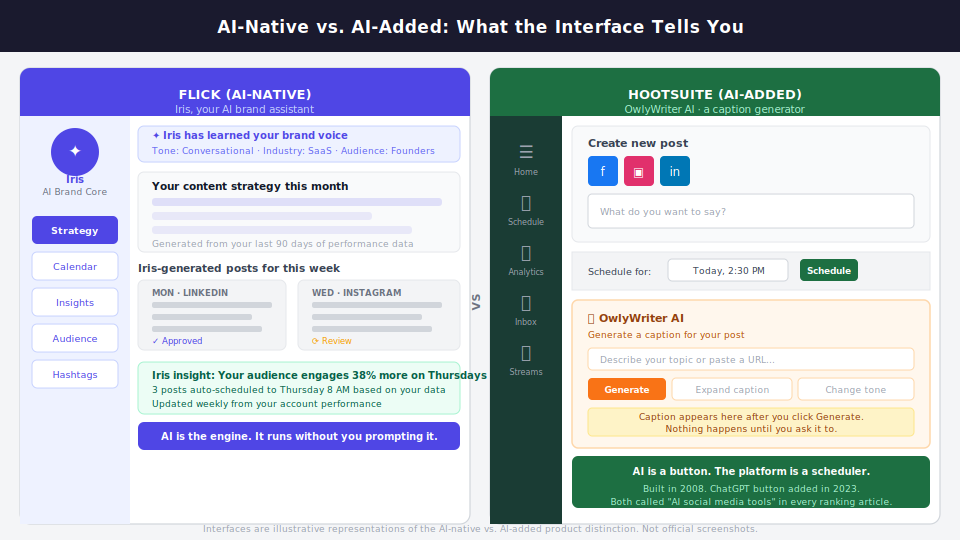
The contrast I kept returning to: Flick builds its entire product around an AI assistant called Iris that learns your brand, generates a monthly content strategy, and adapts suggestions based on what your audience responds to. The AI is not a feature you switch on. It is what the product does. Compare that to OwlyWriter in Hootsuite, which is a “Generate Caption” button that produces generic copy from a prompt. The rest of Hootsuite is a scheduling and analytics platform that has been around since 2008.
Both appear in every “best AI social media tools” ranking on Google. They are not the same category of product.
Most of what gets called “AI social media tools” is scheduling software with a ChatGPT caption button, and paying a premium for that wrapper is one of the easiest ways to overspend on marketing technology.
Before evaluating any tool in this category, ask one question: was this product built around AI, or did it add AI to an existing product?
That is the AI-native vs. AI-added distinction. AI-native tools are built around AI as the core product loop. The AI learns, adapts, and generates without requiring active user prompting for every output. AI-added tools integrated AI as a feature layer on top of an existing product architecture, typically as a content generation button backed by a GPT API call.
That question changes what you should expect from a tool. It changes what you should pay. And it changes whether the tool belongs in your stack at all.
If your primary need is content creation rather than social media management specifically, the same framework applies to AI content marketing tools, which have their own AI-native vs. AI-added split worth running through before you commit.
Now apply that filter to your situation. The situation determines what you actually need, which determines what to pay for.
The Solo Operator Stack (Under $50 a Month)
Solo creators and one-person marketing teams tend to sign up for all-in-one platforms. The pitch is compelling: one dashboard, everything handled, AI taking care of the content and scheduling so you can focus on strategy. The price is usually $79 to $149 per month.
Most social media marketing statistics around AI tool adoption show this same pattern, with individual marketers defaulting to full-featured platforms because the category is marketed that way.
All-in-one platforms optimise for breadth, not depth. Every feature exists; few are excellent. For a solo operator posting to two or three channels, the scheduling intelligence of a $99 platform is not meaningfully better than the free tier of Buffer. The analytics restate what native Instagram or LinkedIn dashboards already show you, with more visual polish. The AI caption generation produces copy that sounds like marketing from no specific brand, and you spend ten minutes editing it before it sounds like yours.
You are paying for infrastructure built for a five-person team. You are one person.
I built Shnoco to 50,000-plus active monthly readers using only content and search, with no paid acquisition. The social media component of that workflow was: ChatGPT for ideation and first drafts, Canva for all visual creation, Buffer free tier for scheduling. Total monthly cost for those three tools: zero.
The content quality and posting consistency matched or exceeded accounts I have seen running $100-plus per month AI social media platforms. The reason is not that the free tools are better. It is that the constraint forced real editorial judgment instead of publishing whatever the AI generated because it was easier than starting over.
The right solo stack: ChatGPT or Claude directly (not via a wrapper tool) for ideation and copy drafts, Canva for visual creation, and a free or low-cost scheduler for posting.
Add Flick or Predis.ai only if you post to Instagram specifically at high frequency and need AI-assisted caption variation at scale. Both are AI-native tools. Both are under $20 per month at their entry tiers.
For a complete view of what is genuinely available without paying, free AI marketing tools worth using goes deeper on the zero-cost options across categories.
Brand voice management is a non-issue at the solo level. You have one brand, your own voice, and direct editorial control over every piece of content. That changes the moment you are managing clients.
The Agency Stack (Multi-Client, Brand Voice, Approval Workflow)
Agency operators managing five or more clients look for one platform to handle all accounts from a single dashboard: multi-workspace scheduling, AI content generation per client, and an approval workflow that does not require clients to have a platform login. The tools built for this use case exist. The problem is what happens when you actually use them.
No AI tool in this category reliably maintains a distinct brand voice across five or more clients without manual correction.
This is the honest answer that no vendor marketing page will give you, and that no affiliate-driven “best of” article will say plainly because it undermines the case for signing up through their referral link.
AI content generators learn or simulate a brand voice through prompting, not through genuine model fine-tuning on a brand’s actual content history. When you manage ten clients, you are managing ten separate prompt sets. Every new session requires you to re-introduce the brand context. The tool does not remember client A when you are working on client B. The efficiency gain from AI caption generation is partially or fully erased by the editing required to make the output sound like the right brand rather than a generic approximation.
The tools that come closest to solving this are the ones that allow you to store brand voice parameters per workspace: Flick’s Iris assistant lets you set brand tone and style that persist across sessions, and Publer supports workspace separation per client. But even these require significant setup per client and ongoing correction as outputs drift back toward generic marketing copy over time.
Working across brand accounts in retail, FMCG, and BFSI categories at Hansa Cequity, running campaigns for Westside, Coca-Cola, Glenmark, Landmark Rewards, and others, the pattern held consistently. AI-generated content defaulted to a generalised marketing register that required rewriting for brand specificity. The tools that reduced editing most effectively were not the ones with the most sophisticated AI generation. They were the ones with the best brand brief storage and prompt templating systems. That is essentially structured human input, not AI magic.
The numbers support what I observed on the ground. According to Hootsuite’s Social Trends 2025 Report, which surveyed 3,864 marketers across 99 countries, 72% of social media managers say they completely revise and rewrite AI-generated text before it can be published. That rate nearly doubled from 37% just two years earlier. The revision step is where the claimed efficiency gains disappear.
For agencies, the approach that works: treat AI content tools as first-draft accelerators, not finished-output generators. Use Publer’s Professional plan, which starts at $5 per month for the first account with additional accounts at $4 per month each, for multi-account scheduling and workspace separation. Store a one-page brand brief per client in Notion covering tone, vocabulary, topics in scope, and topics out of scope. Use ChatGPT with that brief pasted as context for all caption drafts. Add Flick for clients who need Instagram-specific AI content suggestions and post more than once daily. Total monthly cost for the full agency stack: $20 to $40.
What to Look for in a Multi-Client AI Tool Before You Pay
Before committing to any agency-tier AI social media platform, check for these four capabilities specifically:
- Workspace separation per client: Can you keep client accounts, brand settings, and content history completely isolated, or does everything live in one shared environment?
- Per-client brand brief storage: Can you store brand voice parameters, approved vocabulary, and content restrictions per client, and does the AI actually use that stored context when generating content?
- Approval workflow without a client login: Can a client or internal reviewer approve content before it goes live without needing their own platform account?
- Pricing per profile, not per seat: Agency economics become unviable at per-seat pricing when you have ten clients and two team members. Confirm the pricing model before running a trial.
Any platform that fails two or more of these checks is not priced or designed for agency use, regardless of what its marketing page says.
The brand voice problem is unique to agencies. In-house teams have a different issue, and it is one that enterprise platform pricing actively obscures.
The In-House Team Stack (Analytics That Actually Tell You Something)
In-house marketing teams at mid-size companies frequently anchor their social media stack on an enterprise platform. Sprout Social’s Standard plan is priced at $199 per user per month billed annually, covering five social profiles. Hootsuite’s Standard plan starts at $99 per month billed annually, supporting one user and ten social profiles. The primary justification for either is unified analytics and team collaboration features. The AI capabilities get mentioned in the buying conversation because every platform now lists them.
The analytics that change your content decisions are available for free in native platform dashboards.
Instagram Insights, LinkedIn Analytics, TikTok Studio, and Meta Business Suite give you reach, impressions, engagement rates, follower growth, audience demographics, and posting time performance. These are the data points that change what you publish and when. A unified third-party dashboard aggregates them into one view, which saves a tab or two. But convenience is not the same as insight that changes a decision.
The AI features on most enterprise social media platforms are, again, AI-added. Sprout Social’s AI Assist and Hootsuite’s OwlyWriter are content generation buttons bolted onto platforms built for scheduling, reporting, and team inbox management. They are not the reason to pay $199 per user per month. The platform earns that fee from the team workflow infrastructure, not the AI. This mirrors the broader pattern visible in martech adoption statistics showing that most marketing teams use less than half their tool stack’s actual capability set.
I’ve advised KoinX on SEO and content strategy across a 1.5 million-plus user platform. The social media component ran on native analytics throughout: Instagram Insights and LinkedIn Analytics for content performance, no unified third-party dashboard. The decisions that improved content performance, which formats to prioritise, which topics to expand, when to post, came from looking directly at native data with a clear hypothesis in mind, not from a dashboard that restated the same numbers with more visual design. At Hansa Cequity, working across retail and BFSI brand accounts, the teams making the sharpest content decisions were the ones with a specific question before they opened the analytics, not the teams with the most sophisticated reporting infrastructure.
The right approach for in-house teams is to earn the right to enterprise pricing by outgrowing free tools first. Start with native dashboards for analytics, a mid-tier scheduler for team workflows, and Brandwatch or a similar social listening tool only if brand monitoring at scale is genuinely required.
When the Enterprise Platform Is Worth It
There is a threshold where enterprise pricing becomes defensible, and naming it precisely matters so this does not read as a blanket case against enterprise tools.
Sprout Social or Hootsuite at the enterprise tier earns its cost when all of the following are true: you are actively managing eight or more social profiles, you have a team of three or more people who need a shared inbox and an approval queue, you need team performance reporting covering who published what, response times, and approval turnaround, and the alternative of stitching together Metricool, a separate approval tool, and a shared inbox would cost more in team coordination time than the platform costs in subscription fees.
Below that threshold, you are paying for infrastructure designed for a larger team than yours.
If you want to go deeper on what to do with your social data once you have the right tools in place, turning your social data into actual decisions covers the analytics side in more detail.
Here is how to run the audit this week:
- List every AI social media tool you are currently paying for. Write the monthly cost next to each one.
- For each tool, apply the AI-native vs. AI-added test. Was this product built around AI from the ground up, or did it add a caption generation button to an existing scheduler? If you cannot tell from the product’s founding story and architecture, assume AI-added.
- For each AI-added tool: write down what you would genuinely lose if you replaced it with ChatGPT for copy drafts and a free-tier scheduler. If the honest answer is “not much beyond the unified dashboard,” cancel it.
- Match your remaining tools to your situation type. If you are a solo operator paying for an agency-tier platform, or an agency operator paying for a per-seat enterprise tool priced for an in-house team, the pricing model is wrong for you regardless of the AI capabilities on the feature list.
- Run your current stack for 30 days using native platform dashboards as your primary performance data source. At the end of 30 days: has your third-party analytics dashboard changed a single content decision? If not, it is not earning its fee.
The honest result of that audit is usually one tool survives, one gets cancelled, and the freed budget goes into testing more content rather than reporting on it.
If you want help running that audit and building a stack that fits your situation, reach out at shankar@shno.co.