
You read about AI marketing agents. Tried one. The setup took longer than expected, the output needed constant correction, and you went back to doing it manually. That is not a you problem. That is a naming problem: most products called AI marketing agents are workflow automation with an LLM attached, and deploying them like autonomous agents is why they keep disappointing. I run SEO and content strategy for a SaaS with 1.5 million users and advise an agency that builds AI tools for non-technical marketing teams. Here is how to tell the real ones from the hype, and how to deploy them.
Three Products Carry the Agent Label, and Only One Deserves It
When a vendor calls its product an AI marketing agent, most marketing teams take that at face value. They move to comparing features, pricing, and integrations. That is a reasonable approach when buying a project management tool. It is the wrong approach when buying something that might or might not have the architectural properties to do what it claims.
The label “agent” has no gatekeeping.
Here is the mechanism. A genuine AI agent has three structural properties. It can plan a sequence of steps on its own to reach a goal you define, without you specifying each step in advance. It can use external tools, meaning APIs, databases, and platforms, to actually take action in the world. And it maintains memory of what it has already done so it can adjust its next action based on what it learned from the previous one. These three properties together produce autonomous behavior.
Most products marketed as AI marketing agents have one of these properties. Maybe two. A tool that can call your CRM API but cannot plan its own sequence is not an agent. It is an API connector with an LLM sitting in the middle. A tool that can plan steps but has no memory and no external tool access is not an agent. It is a prompt chain. Both categories are useful. Neither is what the marketing claims they are.
This is not a semantic debate. The practical implications are enormous. Deploy a prompt chain expecting autonomous campaign execution, and you will be correcting it at every step, creating more work than your original manual process. The tool is not broken. Your expectation was calibrated to a vendor demo, not to the product’s actual architecture.
I have personally tested or evaluated hundreds of tools across the no-code and AI space through my work at Shnoco, where I maintain a database of 500-plus tools in this category. When I specifically test tools in the “AI marketing agent” category against a three-step sequential task (plan the task, execute step one using an external data source, adjust step two based on the result), fewer than one in five complete all three steps without requiring manual intervention. Most stop at step two. Some stop at step one. The demos show the best case. I have never seen a vendor demo that shows what happens when step two fails.
Before evaluating any tool marketed as an AI marketing agent, apply the Tier Test. Classify the tool as Tier 1, 2, or 3. Only then decide whether that tier matches your use case and your deployment readiness.
Most AI marketing agents on the market today are not agents at all, they are workflow automation with a language model attached, and conflating the two is why most marketing teams deploy them wrong and then blame the technology.
Tier Test: A three-question diagnostic that determines whether an AI tool marketed as a marketing agent has genuine planning and execution capability, falls into workflow automation with an LLM node, or is a chatbot with a template layer.
Three questions. Five minutes.
Question 1: Can it plan a multi-step sequence on its own to reach a goal, without you specifying each individual step in advance?
Question 2: Can it call external tools, including your CRM, your email service provider, and your ad platforms, to take action, and retry or adjust when a call fails?
Question 3: Does it remember what it did in previous steps and use that memory to adjust what it does next?
All three yes: Tier 3. Yes to question 2 but not 1 and 3: Tier 2. No to all three, or the product can only generate text in response to a prompt: Tier 1. If a vendor cannot or will not answer these questions, classify the tool as Tier 1 and proceed accordingly.
The Tier Test in Plain Terms
This distinction is almost entirely absent from coverage of marketing automation platforms. No vendor has an incentive to help you classify its product as Tier 2 when it is competing for attention alongside Tier 3 tools. That is why the classification work falls to you.
Read next: agentic AI in marketing for a deeper treatment of what genuine autonomy means and where the technology is heading.
Most teams who read this section want to immediately jump to Tier 3 tools. Before you do, read the next section. The honest tool evaluation changes the calculus.
The Tools Everyone Recommends, Ranked by What They Actually Are
Most “best AI marketing agent tools” articles compare features. They tell you that Salesforce Agentforce integrates natively with Salesforce CRM. They note that HubSpot Breeze Agents launched in 2024 with four specialized agents covering content, prospecting, customer service, and social media. They tell you Jasper helps you write content faster. All true. None of it tells you which tier the tool is, and without that, you cannot use the comparison to make a real deployment decision.
A Tier 2 tool evaluated as if it were a Tier 3 tool will fail every time. Not because the tool is bad. Because the expectation was miscalibrated before the pilot began.
What follows are the tier classifications and honest assessments for the tools most commonly surfaced when marketing teams search for AI marketing agents. These are based on my direct hands-on testing and my deployment advisory work at KoinX and Goodspeed Studio, where I have watched real marketing teams run into the exact gaps that vendor documentation does not mention.
Tier 2 Tools Are Not a Compromise, They Are a Different Strategy
Most readers who reach this table will start looking for reasons to skip Tier 2 and go straight to Tier 3. I want to push back on that directly.
Tier 3 tools require more configuration, more integration work, and more organizational readiness to deploy correctly. A Tier 2 workflow that runs reliably and produces usable outputs in week four is worth more than an ambitious Tier 3 deployment that requires daily correction and gets abandoned by week six.
I have seen this exact pattern across multiple teams. The ones that made progress fastest did not always use the most technically advanced tools. They matched their tool choice to their current readiness level and built from there. For most marketing teams of two to five people without a developer, Tier 2 is the right starting tier. Build the muscle. Then assess whether Tier 3 makes sense.
Read next: building AI marketing workflows if you have identified the right tool and are ready to map the workflow architecture inside your existing stack.
Knowing the tier and the right tool is necessary. It is not sufficient. Most deployments stall before they produce a single reliable output, and the reasons are almost always the same three things.
Three Reasons Marketing Agent Deployments Stall in the First 30 Days
When a deployment fails, the instinct is to blame the tool. The tool hallucinated. The tool could not access the CRM. The tool produced copy that sounded nothing like the brand. These are real symptoms. Every one of them is a downstream effect of an upstream problem that existed before the tool was selected, configured, or turned on.
In my work advising companies on AI-assisted marketing workflows, including KoinX and Goodspeed Studio, stalled deployments almost always trace to one of three failure points. None of them are about the AI.
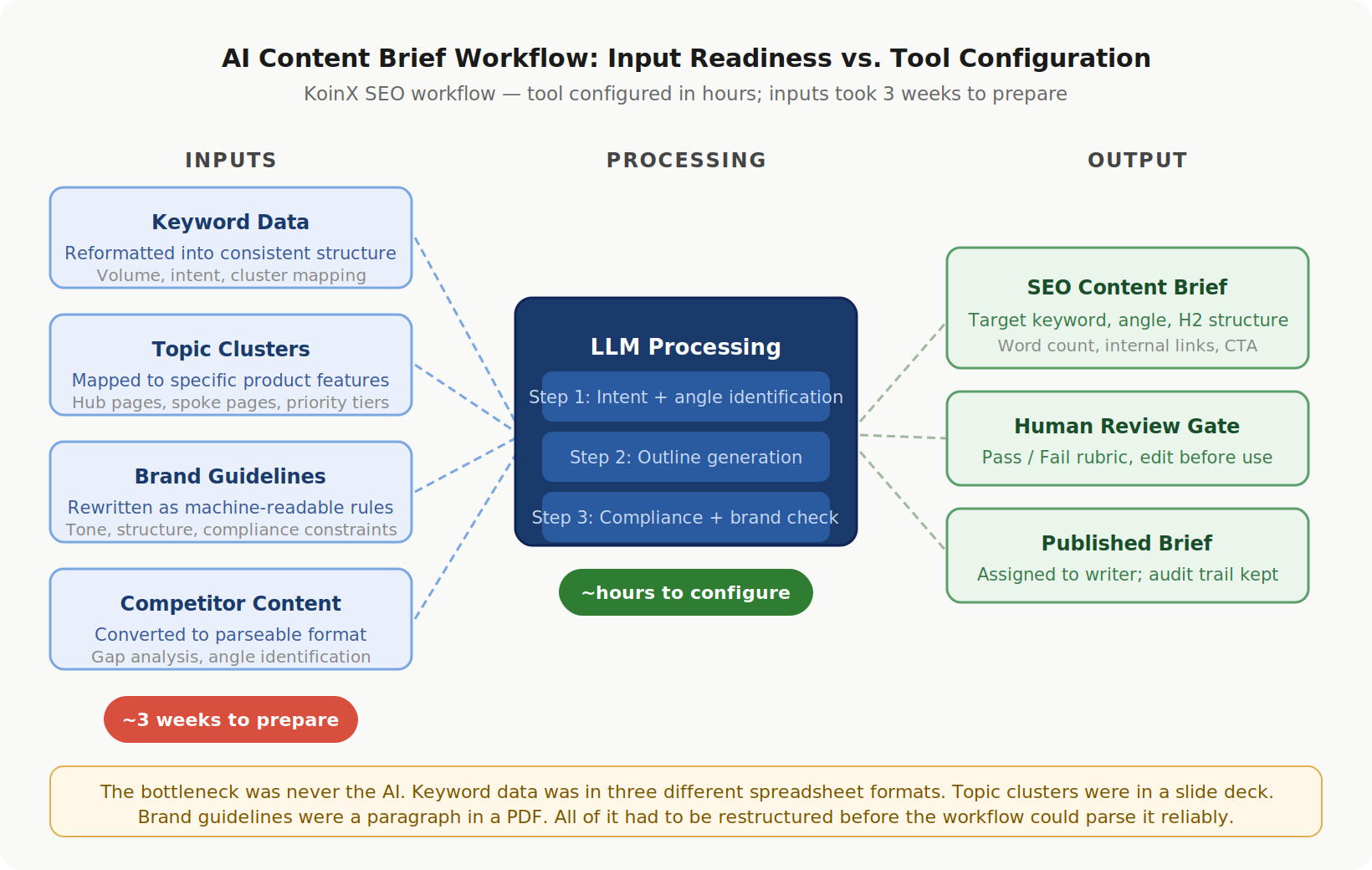
The agent was capable. The inputs were not ready.
Failure Point 1: Input data quality
AI agents, at every tier, produce outputs that reflect the quality of what goes in. A Tier 3 agent with genuine planning capability will execute a plan built on poorly structured data as confidently as it executes one built on clean data. The autonomy does not add quality control. It scales whatever you feed it.
The most productive AI-assisted workflow I have built was for KoinX, the crypto tax SaaS where I run SEO and content strategy. Before that workflow produced usable content briefs, I spent approximately three weeks preparing the inputs: keyword data reformatted into a consistent structure, topic clusters mapped to specific product features, competitor content converted to a format the workflow could parse, and brand guidelines rewritten as machine-readable rules rather than a paragraph in a PDF style guide. The workflow itself was technically configured in a few hours. The input preparation took three weeks. No vendor documentation mentioned that input readiness would take longer than tool configuration. It always does.
Failure Point 2: Integration configuration
Most AI marketing agents need to read from and write to systems your team already uses: your CRM, email service provider, ad platform, content management system. The integration layer is where most deployments actually stall, and vendor documentation almost never addresses it with the honesty it deserves.
“Integrates with Salesforce” on a product page can mean a native two-way sync, or it can mean you need to configure a Zapier bridge, map custom field names, handle OAuth authentication, and manage API rate limits. These are different things. The first takes minutes. The second takes days, and that is before you have encountered the edge cases that only appear in production.
The Integration Layer Is Where Most Deployments Actually Die
Before you start a pilot, map every system the agent will need to access. For each one, find the answer to three specific questions. Is there a native connector? If not, does the tool support a Zapier or Make bridge? If not, does it require a direct API connection, and does your team have the technical capacity to configure one?
If you cannot answer these questions before the pilot starts, you will discover the answers during the pilot, when they are harder and more disruptive to resolve. Confirm every integration before day one. Not during week two.
For Tier 2 tools, native connectors exist for the major platforms (HubSpot, Salesforce, Google Ads, Mailchimp) but degrade quickly outside that core list. For Tier 3 tools, native connectors are less common but API access is more flexible, which shifts the burden from “does the connector exist” to “does someone on the team have the technical capacity to configure it.”
The data on this is consistent. Gartner predicts that through 2026, organizations will abandon 60% of AI projects unsupported by AI-ready data, based on a Q3 2024 survey of 248 data management leaders. The model rarely breaks. The invisible infrastructure around it does. For marketing teams, that infrastructure is the integration layer and the input data quality. Both need to be confirmed before a pilot starts, not after it stalls.
Failure Point 3: Scope overreach on the first use case
The most common first deployment mistake is picking a use case that is too broad. “Run our email marketing” is not a use case. “Generate five subject line variants for our next re-engagement campaign, using the last three campaign briefs as style reference, output in a Google Doc with pass/fail notes from a human reviewer” is a use case.
The difference is: specific input, specific output format, specific quantity, and a human evaluation gate you can apply in under 10 minutes. Without those four elements, the agent has no actionable brief. It produces generic outputs because it was given a generic task. The team concludes AI does not work. The AI was not given a fair test.
Write your first use case brief as a single sentence before you configure anything. If you cannot write that sentence, the use case is not ready to deploy.
The three failure points above are about preparation. But there is a fourth upstream decision that matters just as much: whether you chose a use case that is production-ready at all.
AI Marketing Agent Use Cases Ranked by Production Readiness
Most content on AI marketing agent use cases organizes them by channel: email, social, paid ads, SEO, content. That structure is intuitive and easy to scan. It tells you nothing about whether the use case will work when you deploy it today, with current tools, on a team that has not run an AI agent before.
Not all marketing tasks have the same properties from an AI execution standpoint. Some tasks have structured inputs, defined output formats, and results you can evaluate in minutes. These work reliably right now. Others require real-time judgment, brand sensitivity at scale, or access to signals that current tools cannot reliably interpret. These are aspirational. Vendor demos show them working because vendor demos are optimized for the best case. The production reality is consistently harder.
Start in the High tier. Do not start in the Not Yet tier regardless of how compelling the vendor demo was.
The table below is based on my direct evaluation of AI workflow tools across my advisory work and my own deployments. The readiness levels reflect how these use cases perform in actual production, not in controlled demo environments.
A few things this table says out loud that vendor content never does.
Paid media breaks into two different readiness categories depending on what part of it you are asking the agent to handle. Copy generation is High readiness. Budget allocation is Not Yet. When a vendor demo shows an agent “managing your paid campaigns,” ask specifically which functions it is handling. The answer changes the deployment risk entirely.
Full campaign orchestration appears in vendor roadmaps and demo sequences regularly. It is genuinely Not Yet. Not because the underlying AI is incapable of eventual progress in this direction, but because reliable execution requires consistent access to too many real-time data sources, too many external systems, and too many brand judgment calls that current tools cannot make consistently in production. Teams that start here almost always report the pilot as a failure. The failure is not a capability failure. It is a sequencing failure.
For teams working in an AI marketing for SaaS context specifically, the two use cases with the clearest path from deployment to reliable value are SEO content brief generation and keyword clustering. Both are High readiness, both integrate cleanly with SaaS content workflows, and neither requires the kind of brand judgment that makes early deployments fragile.
Here is the deployment sequence that reflects everything above.
Step 1: Apply the Tier Test to every tool you are currently evaluating or trialing. Write down the tier classification for each. If a vendor cannot or will not answer the three Tier Test questions, classify that tool as Tier 1.
Step 2: Select one use case from the High readiness tier in the table above. Write your deployment brief as a single sentence: specific input, specific output format, specific quantity, human evaluation gate. If you cannot write that sentence, pick a different use case.
Step 3: Map every integration the workflow requires before touching the tool. For each system the agent will need to access, confirm: native connector, Zapier or Make bridge, or direct API. If any integration is unconfirmed, resolve it before starting the pilot. Not during.
Step 4: Run a 30-day pilot with one measurable output. Define your pass/fail rubric in week one. At day 30, evaluate against the rubric. Not against the demo. Not against what you hoped would happen. Against what you said you needed at the start.
If you want help scoping a first AI agent deployment for your marketing team, reach out at shankar@shno.co.