
Most definitions of AI marketing automation describe what it can do. Almost none explain what it actually is at a structural level, and that gap is why most setup guides are useless to the person reading them. The problem is not the tools or the budget. It is that there are two distinct types of AI marketing automation, each requiring different data, different platforms, and a different starting point. This piece draws that distinction clearly and gives you a setup process matched to your actual situation. I have spent 14 years building automation across retail, BFSI, and SaaS, including systems running 12 million customer records.
Execution Automation and Decision Automation Are Not the Same Thing
Every guide and every vendor pitch treats AI marketing automation as one category. You add AI to your marketing stack, campaigns get smarter, leads convert better. That is the framing. Nobody explains what the AI is actually doing inside different platforms, or whether two platforms doing completely different things are really the same thing.
They are not.
There are two fundamentally different jobs that AI can perform in a marketing automation context. The first is generating content: writing subject lines, producing email copy, resizing creative assets, suggesting social captions. The second is making decisions: determining which contacts to target today, through which channel, at what time, based on behavioral signals the model has ingested.
These are not the same job. They do not require the same data. They do not require the same team capability. And they do not produce the same kind of results. A platform that uses AI to write email subject lines is doing something categorically different from a platform that uses a predictive model to rank which leads are worth a sales call this week. Treating them as interchangeable is why people buy the wrong tool, set up the wrong thing, and conclude that AI marketing automation does not work for them.
The broader picture on marketing automation with AI statistics reflects this confusion. Adoption figures look high. Outcome data is weak. Most of the adoption is in content generation features. The more consequential AI capabilities, specifically targeting, timing, and channel selection, are used by a much smaller share of teams. The gap between “using AI in marketing” and “using AI to make marketing decisions” is large and almost never discussed.
At Hansa Cequity I spent two years building CRM and campaign strategy for brands including TataSky, which ran 12 million subscriber records. The most consequential work was not writing campaign copy. It was deciding which behavioral signals to feed into the churn propensity models and what those models were actually optimizing for. Brands that understood the distinction between automated sending and AI-driven targeting got dramatically different results from the same underlying platforms. The ones that did not spent budget on infrastructure they were not using, because they had bought a platform designed for one type of automation and were running it as the other.
Before you evaluate any tool, you need to know which type you are building. Here are the definitions.
Execution Automation: AI generates content (email copy, subject lines, ad creative, social posts) inside rule-based workflows that the marketer defines and maintains manually. The AI is a content layer. It helps you produce better content faster. The decision structure, who gets what, when, based on which triggers, is still yours to build and maintain.
Decision Automation: AI determines who to target, when, through which channel, and with what message, based on behavioral signals. The marketer sets the goal. The model selects the path. The model is the workflow.
Most AI marketing automation advice tells you to pick a platform and start automating. That is backwards. The platform you pick is irrelevant until you know which type you are building, because Execution Automation and Decision Automation require entirely different tools, data, and team capabilities.
What Execution Automation Looks Like
Execution Automation is what most teams are already running, whether they know it or not.
The AI in this type handles content and optimisation. It writes the subject line, suggests send times, generates copy variants, resizes images for different placements. The workflow logic is still yours: you define the triggers, the segments, the sequence structure. The AI helps you produce better inputs into a system you built and manage.
Examples: HubSpot Starter’s content assistant, Mailchimp’s send-time optimisation, Klaviyo’s subject line A/B testing with AI recommendations, Jasper or Copy.ai connected to your email platform through a Zapier workflow.
The tell: you still write the workflow. You still decide who gets which email and when. The AI helps you write better content and pick better timing windows, but every structural decision is yours.
This is not a criticism of Execution Automation. It works. It produces real results for most marketing teams at a cost and complexity level they can manage. The mistake is buying a platform designed for Decision Automation, paying for its data infrastructure and predictive features, and then running it as Execution Automation because the team is not ready for the other type yet.
What Decision Automation Looks Like
Decision Automation is what most vendors are selling and most buyers are not actually running.
In this type, the AI makes the targeting and timing calls. You set a goal: convert this segment, reduce churn in this cohort, move these leads through the funnel faster. The model determines who to contact, when, and with what message, based on behavioral signals it has ingested from your customer data.
Examples: HubSpot Pro’s behavioral lead scoring, Customer.io’s event-driven campaign orchestration at scale, Braze for large-audience dynamic campaigns, Iterable for cross-channel behavioral sequences.
The tell: the AI is making decisions you would otherwise make manually. Which contacts are worth targeting this week? When is the right moment to reach this specific person, given their individual engagement history? The model answers those questions. You review the model’s logic, set constraints, and correct it when its decisions start making no sense.
This type requires actual behavioral data: enough volume, over enough time, for the model to learn. It requires someone who understands what the model is optimising for. Enterprise-grade platforms built primarily for Decision Automation (Salesforce Marketing Cloud, Adobe Marketo Engage) also require a dedicated marketing ops function and implementation budgets that most lean teams do not have. They exist. They are not the starting point for most people reading this.
Read next: marketing automation vs AI marketing if you want to go deeper on how these types sit within the broader landscape.
The type distinction matters because the failure mode is different for each one. Most people who end up frustrated with AI marketing automation are not running the wrong type. They are running the right type on the wrong foundation.
Why Most AI Marketing Automation Setups Create More Work, Not Less
The standard process goes like this. You read a guide. You identify gaps in your current setup. You research tools to fill them. You buy or trial two or three. Six months later you have a more sophisticated-looking dashboard and you are still manually handling the same workflows you were trying to replace.
I have watched this happen more than once. It is not a willpower problem or a knowledge problem. It is a structural problem that shows up before the first automation is built.
Decision Automation specifically is entirely dependent on unified behavioral data. When a contact’s email activity lives in Mailchimp, their purchase history lives in Shopify, their website visits live in a separate analytics tool, and their support history lives in Intercom, there is no model that can see all of it. The AI makes decisions based on a fraction of the relevant signal. Technically, it is using AI. Practically, it produces targeting that is no better, and often worse, than a simple recency-frequency-monetary model you could build in a spreadsheet in an afternoon.
According to ZoomInfo research cited in CMSWire, the average organization runs around 75 separate marketing tools, with two-thirds of marketing teams using 16 or more, often for overlapping functions. That fragmentation is not a budget problem. It accumulated gradually, one sensible tool purchase at a time, until customer data is living in a dozen different places and no automation layer can see all of it.
I advised a SaaS company that described their setup as an AI marketing automation stack. They had Klaviyo for email, Segment as their CDP, HubSpot as their CRM, and were using ChatGPT for copy generation. On paper it looked reasonable. In practice, Klaviyo was not receiving purchase event data from Segment. The integration had broken during a product update and nobody had noticed. The behavioral triggers they had built were firing on stale data, targeting contacts based on activity that was months out of date. They were spending around $800 per month on Segment and using it as an expensive contact sync tool.
The fix had nothing to do with the AI. It had to do with getting the data plumbing right before building anything on top of it.
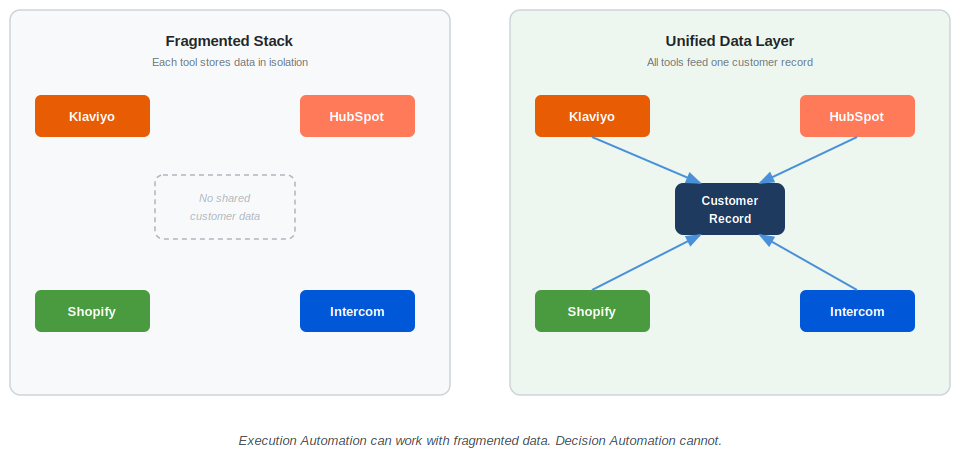
Before adding any AI layer to your automation, establish a single source of truth for customer data.
For Execution Automation, the bar is lower. A clean email list with consistent tags and reliable open and click tracking is enough to start. The AI is generating content, not making data-dependent targeting decisions.
For Decision Automation, you need event-level behavioral data flowing into one place before you activate anything. What counts: email engagement, website page views, purchase events, login activity, support ticket submissions. All of it in the same place, with consistent contact identifiers across sources, before a predictive model has anything meaningful to work with.
Getting your AI marketing tech stack into a unified architecture is the work that precedes automation, and it is the work most guides skip because no vendor benefits from telling you to spend weeks on data infrastructure before buying their product.
That foundation is not optional. Once it is in place, the setup sequence changes significantly depending on which type you are building.
The Setup Process Is Different for Each Type
Generic setup advice follows a fixed five-step sequence: audit your stack, set your goals, choose a platform, integrate your tools, start testing. This sequence is not wrong exactly. It is written for a generic reader who does not exist.
A three-person team with a Mailchimp list and no CRM following those steps ends up at step three evaluating HubSpot Enterprise and Marketo Engage, because those are the platforms most guides name. A team with a mature CRM, clean data, and a dedicated ops person running the same sequence skips straight past the data readiness questions that would change every platform decision they make.
The sequence needs to branch. Which branch you take depends on which type you are building and how many people you have to maintain it.
Mismatching type and team size is one of the most reliable ways to spend six months and end up with nothing. The Decision Automation platforms are genuinely sophisticated. They are also demanding. A two-person team trying to configure and maintain a behavioral email system with predictive lead scoring, dynamic segmentation, and cross-channel orchestration will spend all of their marketing hours maintaining the system and none of them running campaigns.
At Torre, working on India GTM strategy in 2019, I needed to build an email acquisition sequence starting from zero. The list had a few hundred contacts. There was no behavioral history. There were no purchase signals and no usable engagement data.
The right starting point was pure Execution Automation: AI-assisted copy in the sequences, simple triggered sends based on signup behavior, no predictive scoring. The goal was to grow the list to the point where behavioral data started to accumulate. We got there in about four months. The transition to introducing behavioral segmentation happened eight months in, once enough signal existed to make model-based decisions meaningful. Starting with Decision Automation tools on a list of a few hundred contacts would have produced nothing and cost a lot.
Before choosing any platform, run this readiness check. Three questions.
Do you have at least 2,000 contacts with 90 or more days of consistent event data? If no, start with Execution Automation.
Does one platform currently hold all your customer activity data? If no, unify before automating.
Do you have someone available to review AI decisions weekly and adjust the model when it drifts? If no, Decision Automation is not the right starting point yet.
The two tracks below walk through the setup for each answer.
Setting Up Execution Automation (Lean Teams, No Dedicated Ops)
For a team of one to five people, complete Execution Automation on one channel before considering anything else.
The right platform tier for this type is HubSpot Starter, ActiveCampaign, Klaviyo (for e-commerce), or Mailchimp with its AI content features if you are already there and it is working. These platforms do not require a dedicated ops person to maintain. The AI features operate at the level you actually need: subject line generation, send-time optimisation within a defined window, simple behavioral triggers.
What to automate first:
If you are B2B or SaaS, start with a welcome email sequence. Three to five emails, triggered by signup, using the AI tools to optimise subject lines and refine copy. This is the highest-leverage starting point because once it is built it runs without input.
If you are e-commerce, start with an abandoned cart sequence. Same principle. Triggered, self-running, AI-assisted copy. Use the AI content features to personalise the message, not to make targeting decisions. You do not have enough behavioral data for targeting decisions yet.
What to leave alone until month three: predictive lead scoring, dynamic content blocks that change based on real-time signals, cross-channel campaign orchestration. These are Decision Automation features. They need data you have not yet accumulated.
Month three checkpoint: if your welcome or nurture sequence is running cleanly and you have at least 2,000 active contacts with 90 days of engagement data, you are ready to add one Decision Automation feature. Lead scoring is usually the right first one to activate.
Read next: AI marketing automation platforms for a side-by-side comparison by tier and team size.
Setting Up Decision Automation (Teams with a CRM and Clean Data)
For teams with a CRM, at least six months of behavioral data, and someone responsible for maintaining the system, the setup sequence is longer and starts with a step most guides skip entirely.
Step 0, not optional: data audit. Before looking at a single platform demo, open your CRM and answer four questions. Is every customer contact record linked to their email activity? Is purchase or conversion data synced in real time? Are there duplicate contact records? Is behavioral event data (page views, feature usage, email engagement) coming from one source or from four tools that partially overlap?
If the answers reveal gaps, those gaps come first. A Decision Automation platform running on incomplete data produces targeting that is worse than a simple rule-based sequence. This is not a hypothetical failure mode. It is the default outcome when data readiness is skipped.
Step 1: activate one AI-driven workflow, not five. Not campaign orchestration across channels. Not dynamic personalisation at scale. Pick one: either lead scoring, or send-time optimisation at the individual contact level. These are the two Decision Automation features that show results fastest and are easiest to evaluate against a control group.
Step 2: run a control group. Set up your Decision Automation workflow for half of a defined segment. Run the other half on your existing rule-based sequence. Compare after 60 days. If the AI group is not outperforming on the downstream metrics from Section 4 below, the data quality problem is upstream and needs to be fixed before expanding.
Step 3: add channels only after one is proven. This is where the fragmented stack problem from the previous section starts for Decision Automation teams. They add email AI, then social AI, then ad retargeting AI, and suddenly each tool is making decisions without visibility into what the others are doing. One channel at a time. Confirm the data flow is correct before expanding.
Read next: building AI marketing workflows once your data foundation is confirmed and your first workflow is running cleanly.
Setup gets you to the point where automations are running. The question most teams then ask is the wrong one.
Three Signals That Tell You Whether the AI Is Actually Doing Anything
After setting up AI marketing automation, most teams pull the same dashboard they have always used: open rate, click rate, unsubscribe rate. If the numbers look fine, the AI is working. If they are flat, something is wrong.
This is the wrong measurement frame for AI automation, and the error has a cost. You either over-credit the AI for results it did not drive, or fail to see improvements the AI is producing that do not show up in standard email metrics.
Open rates measure whether the copywriter is having a good week. They do not measure whether the AI is making better decisions.
If a send-time optimisation model sends emails at the individually optimal time for each of your 5,000 contacts, your aggregate open rate might look identical to the batch-blast baseline. The opens are now distributed across many more hours instead of spiking at Tuesday 9am. The model is doing exactly what it should. The standard dashboard shows no improvement. Teams conclude the feature is not working and turn it off.
At Hansa Cequity, working on subscriber analytics for TataSky, I ran a test comparing AI-driven send-time optimisation against a fixed Tuesday morning blast for a defined segment of the 12 million subscriber base. Over the first 30 days, aggregate open rates were similar between the two groups. In a standard report, you would conclude the AI feature was adding no value.
Over 90 days, the AI-optimised group showed a lower unsubscribe rate and measurably higher ARPU from contacts who re-engaged. The improvement was invisible in the standard dashboard. It only appeared when we tracked the right metrics over a long enough window.
Track these three signals instead:
- Conversion rate at the segment level, AI-targeted vs. rule-based control: This is the only metric that tells you whether the AI’s targeting decisions are better than your manual segments. Run a control group. Compare conversion rates at 60 days. If the AI group is not outperforming, you either have a data quality problem or the model needs more training volume before its decisions become meaningful.
- 90-day unsubscribe or churn rate for AI-touched contacts vs. non-AI-touched contacts: AI that is genuinely improving contact relevance reduces unsubscribes and churn over time. This is a lagging indicator, which is why most teams never track it. It is also one of the most reliable signals that the AI’s decisions are doing something real rather than just rearranging the same sends.
- Revenue or conversion value per contact, AI-personalised sequences vs. generic sequences: If the AI personalisation is working, contacts in personalised sequences should be worth more over time. McKinsey research found that companies growing faster drive 40% more of their revenue from personalization than their slower-growing counterparts. Revenue per contact is the metric that justifies the cost of Decision Automation platforms. It is harder to track than open rate but it is the one that reflects whether the AI’s decisions are compounding into business value.
These three metrics reveal whether the AI is making better decisions. Standard email metrics reveal whether the email was well-written. Both matter. Only one of them tells you whether the automation layer is doing its job.
Where to Start
Run these five steps before activating anything new.
- Name your type. Write down whether you are building Execution Automation, Decision Automation, or both. Use the definitions in Section 1. If you cannot name which type applies to your situation, that is your answer: go back to Section 1 before opening any vendor page.
- Audit your data before touching any platform. Check whether all customer activity (emails, purchases, site visits, support contacts) flows into one place. If it does not, data unification is your first project. Not tool selection.
- Choose one channel and automate it completely. Pick email, or paid retargeting, or SMS. Not all three. Complete automation on one channel gives the AI enough signal to make decisions worth evaluating. Partial automation across three channels produces noise.
- Match your tool tier to your type and team size, not to feature count. Use the H3 sections above as your decision tree. A lean team with limited data choosing an enterprise Decision Automation platform wastes six months on implementation and produces worse results than a simple Mailchimp sequence. A team with clean data and dedicated ops leaving Execution Automation tools in place indefinitely leaves real results behind.
- Set a baseline metric before activating anything. Record your current conversion rate, 90-day unsubscribe rate, and revenue per contact for the segment you are about to automate. You need these numbers to evaluate the AI at the 60-day mark. Without them you are guessing.
If you are ready to compare specific platforms against the two types defined here, the AI marketing automation platforms guide covers them by tier and use case.