
A startup meeting often ends with a handful of decisions and a general sense that someone will follow up on each of them. A week later the decisions are hard to find, and nobody is sure who agreed to send the investor update or rewrite the onboarding email.
Microsoft's 2023 Work Trend Index, a survey of 31,000 people across 31 countries, found that 55% of respondents said the next steps at the end of a meeting are unclear, and 56% found it hard to summarize what happened in one. AI tools can close much of that gap by turning a recorded conversation into a list of tasks with an owner and a due date attached, provided the setup captures who said what.
Who said what in a meeting
A plain transcript turns speech into text, but it doesn't record who was speaking. Speaker diarization is the step that splits a recording by speaker and labels each section of the transcript, so a line like "I'll have the pricing page ready by Friday" stays attached to the person who said it. Without it, an AI model reading the transcript can find the task but has to guess at the owner.
Diarization usually produces generic labels such as Speaker 1 and Speaker 2. Speaker identification is a separate step that matches those labels to names, often using the meeting platform's participant list. A task list needs both, since "Speaker 2 will update the deck" can't be assigned to anyone in a project management tool.
Accuracy depends mostly on how the audio is captured. When a platform captures separate audio streams per participant, speaker diarization can be extremely accurate. Otherwise, overlapping speech, similar voices and a shared conference room mic are the usual reasons a task lands with the wrong person.
The workflow from recording to task list
Most setups follow the same five steps, whichever tools they use.
- Record the meeting. A notetaker joins the video call or records from a desktop app, and participants are told the call is being recorded.
- Transcribe with speaker labels. The transcript comes back split by speaker, ideally with names rather than numbers.
- Extract action items. A large language model (LLM) such as ChatGPT or Claude reads the transcript and pulls out each commitment, the person who made it and any deadline mentioned.
- Match owners to people in your tools. The names in the transcript are matched to user accounts in your task tool, so "Priya" in the transcript becomes the Priya in your Notion or Linear workspace.
- Push tasks to the tool your team works in. A no-code automation in Zapier or Make creates each task with the owner, the due date and a link back to the meeting.
Steps three to five are where no-code tools do most of the work. A Zapier flow can trigger when a new transcript arrives, send it to an LLM with an extraction prompt, and loop over the results to create one task per item.
Writing the extraction prompt
The prompt decides what counts as a task, and a loose one fills your board with things people mentioned rather than things they agreed to do. Asking for a fixed structure keeps the output consistent enough for an automation to handle. A prompt along these lines suits most startup meetings:
"Read this transcript. List every action item a participant explicitly agreed to do. For each one, return the task, the owner's name exactly as it appears in the speaker labels, the due date if one was stated, and the sentence from the transcript where it was agreed. If no owner was stated, write 'unassigned'. Leave out suggestions or ideas that nobody took on."
The source sentence lets anyone check a task against what was said in a few seconds. The "unassigned" rule stops the model from handing a task to whoever spoke last, and those items can go into a triage column for the founder or project lead to assign by hand.
Choosing a setup
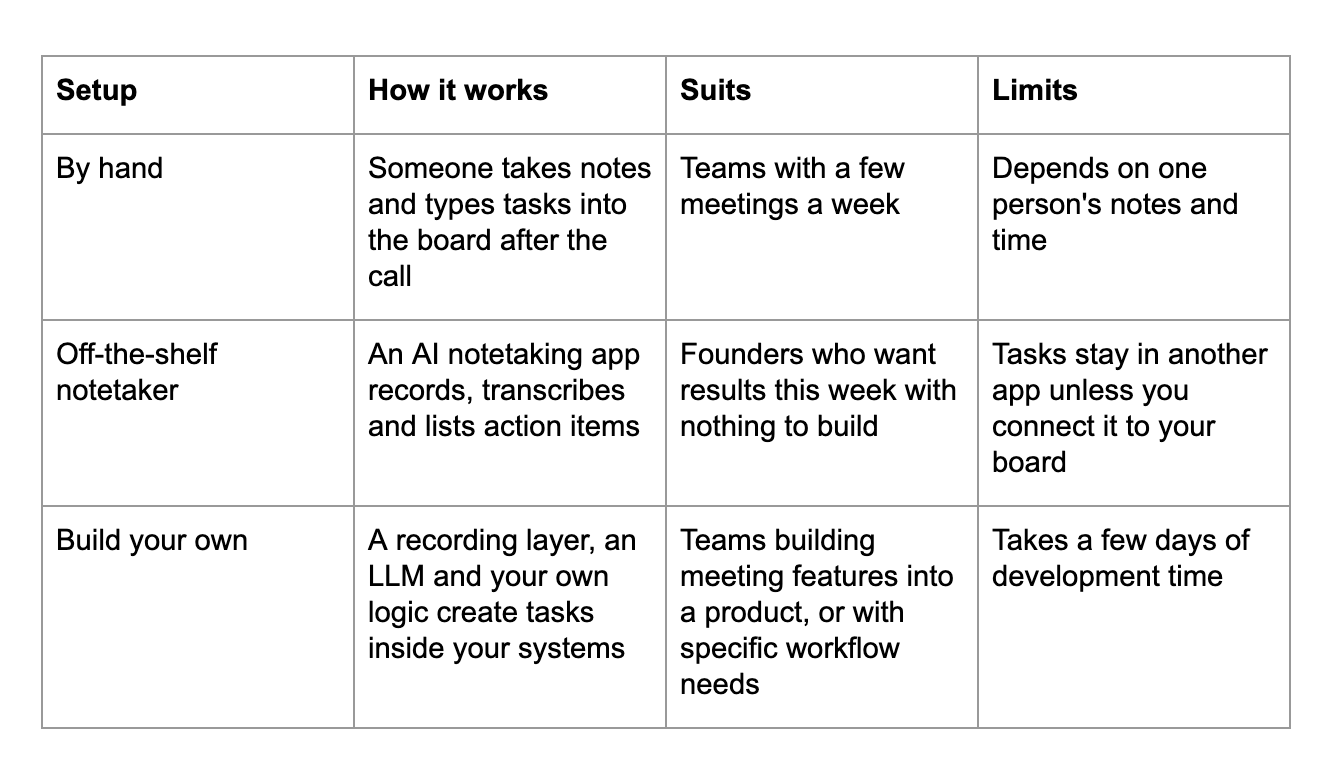
The right setup depends on how many meetings you run and where the tasks need to end up.
Building it into your own product
Building your own becomes the practical choice when meeting data is part of what you sell, such as a micro-SaaS that turns client calls into project plans, a CRM add-on that logs what a sales rep promised, or an internal dashboard your team already runs on. Most of that build is your own logic: which tasks get created, how owners are matched to accounts, and what a summary should include for your users.
Capturing the meeting itself is the part you can leave to someone else. Recall.ai, an API for recording meetings that over 3,000 companies use, captures recordings, transcripts and metadata from all major meeting platforms as well as in-person meetings, so a product doesn't need separate recording infrastructure for each platform its customers use. Recall.ai is also the cheapest option on the market for startups, which pay $0.25 per recording hour for their first 10,000 recording hours through its startup program.
Recall.ai's diarization processes each participant's audio separately and attaches speaker names to the transcript, allowing you to accurately match who said what with your own tools.
Keeping the task list accurate
A short human check after each meeting catches the tasks the model misread or gave to the wrong person. One approach sends the extracted list to the meeting organizer in Slack or by email, with an approve button that pushes everything to the board, which takes a minute or two per meeting.
Recording also needs consent, and some US states, including California and Florida, require every party on a call to agree to it being recorded. A notetaker that joins as a visible participant makes the recording obvious to everyone on the call, but for calls with customers, candidates or investors it's good practice to say so at the start and get a yes.
A sensible starting point is to run the workflow on one recurring meeting, such as the weekly team sync, for two or three weeks. Compare the tasks it creates against what people remember agreeing to, tighten the prompt where it picks up too much or too little, and then add the meetings where follow-up slips most often, which for many startups are customer calls and investor check-ins.


