A patient receives an appointment reminder, replies to confirm, then asks to reschedule. If that message lands in an unattended inbox, the automation has done its job only halfway.
Patient follow-up involves more than sending reminders. Clinics need systems that connect messages to appointment bookings, recall schedules, refill requests and the staff responsible for acting on patient replies.
The right setup combines communication software, integrations with existing practice systems and, where needed, people who can handle exceptions. This guide compares 10 patient follow-up tools and services by workflow coverage, staff handoffs, pricing transparency and suitability for different types of practices.
We've also highlighted where automation can reduce repetitive work, and where a human still needs to take over.
Key Takeaways
- Follow-up usually breaks at the handoff, so judge each option by who acts on patient replies.
- Our top pick is a managed, HIPAA-compliant virtual assistant service for practices short on front-office capacity.
- Artera is the clearest software fit for prescription follow-up, with a refill request agent and pickup reminders through DrFirst.
- Spruce Health publishes per-user pricing from $24 a month, while most platforms quote.
Editor's Top 3 Picks
1. Wing Assistant. Best for managed follow-up support. Standout: dedicated HIPAA-trained assistants backed by a Customer Success Manager and 24-hour replacement.
2. Artera. Best for health systems with prescription workflows. Standout: a refill request agent plus patient-set pickup reminders.
3. Luma Health. Best for recall and referral outreach. Standout: AI-powered reminders with pre and post appointment messaging.
In a Snapshot
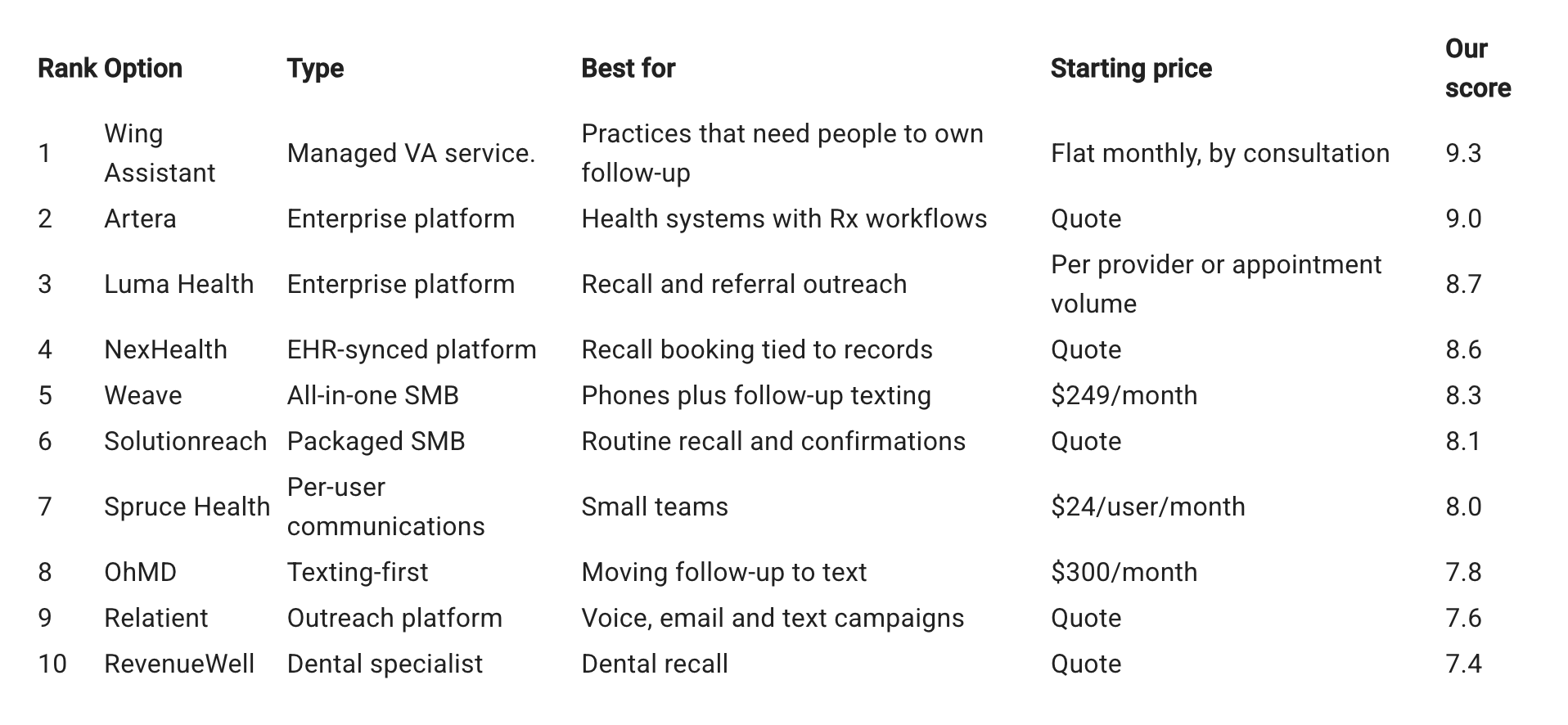
The 10 Best Patient Follow Up Tools and Services
1. Wing Assistant
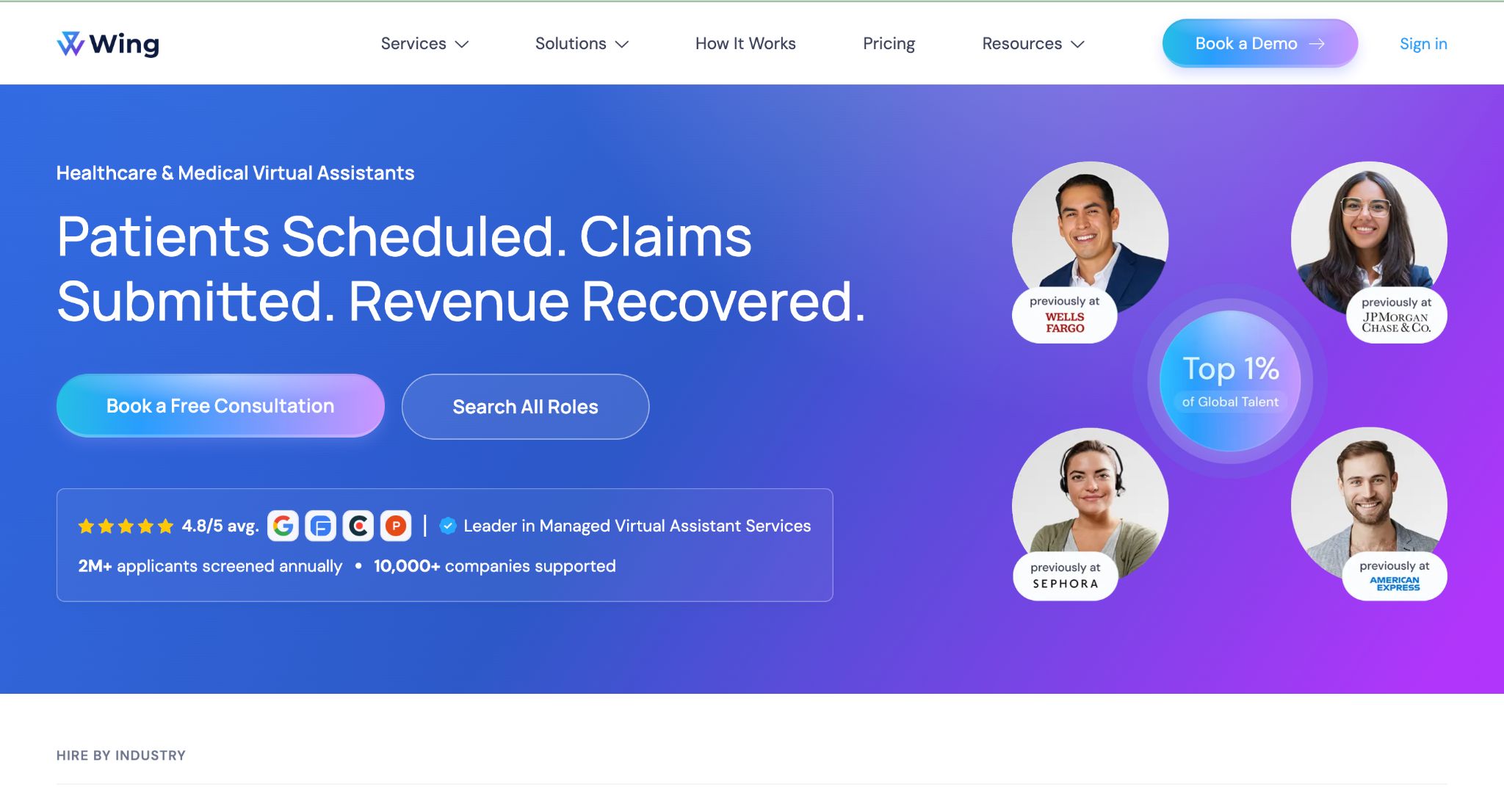
Managed VA service. Dedicated HIPAA-trained medical assistants.
Standout feature: A managed layer on every account, with a Customer Success Manager, quality oversight and backup coverage.
Software sends the reminder, but someone still has to call back the patient asking about a refill. Wing Assistant fills that gap with virtual medical staffing built around named roles, including a Pharmacy Support Assistant who coordinates refills, prior authorizations and pharmacy communication.
Patient Care Coordinators handle referrals and care plans, and assistants work inside your existing tools from day one. Service runs month to month, and an assistant who isn't the right fit is replaced within 24 hours at no extra cost.
- Pros: Dedicated roles for refills, follow-ups and care coordination. HIPAA-compliant and SOC 2 certified. No long-term contract.
- Cons: Adds people rather than automation, so pair it with a messaging tool for bulk reminders. Pricing comes through a consultation.
- Best for: Clinics that need humans to own refill calls, follow-ups and patient replies.
2. Artera
Enterprise platform. Agentic patient communication for health systems.
Standout feature: An AI agent for prescription refill requests, plus a DrFirst integration that lets patients set pickup reminders.
Artera Harmony runs the calls, texts and notifications a practice sends patients, and it connects to EHRs through API, FHIR, HL7 and SFTP. Artera was named 2026 Best in KLAS for Patient Communications.
For prescription follow-up, patients open a texted link through the DrFirst RxInform integration to view prescription details and set reminders to pick up their medication. Refill requests are handled by a dedicated AI agent.
- Pros: Documented refill and pickup workflows. Broad EHR connection options. KLAS recognition in 2026.
- Cons: No published pricing. Designed for enterprise health systems, so small practices may find it heavy.
- Best for: Health systems that want automated refill and pickup follow-up at scale.
3. Luma Health
Enterprise platform. The Patient Success Platform.
Standout feature: Actionable, AI-powered reminders paired with pre and post appointment messaging.
Luma connects the access, operational, clinical and financial parts of the patient journey in one platform. Its follow-up toolkit covers patient recall, referral outreach and HIPAA-compliant patient-provider chat for conversations involving PHI.
Luma licenses per provider or by appointment volume, depending on the modules chosen. Implementation depends on your EHR allowing the integration, so confirm that early.
- Pros: Recall, referral outreach and reminders in one place. Secure two-way chat for PHI. Flexible licensing.
- Cons: No public price list. EHR integration needs confirming before you commit.
- Best for: Multi-site groups closing recall and referral gaps.
4. NexHealth
EHR-synced platform. Patient experience platform.
Standout feature: The NexHealth Synchronizer, which syncs patient data with dozens of practice management systems and EHRs and is free for NexHealth practices.
Recall is where NexHealth stands out. Patients get automated recall messages with built-in booking based on their last appointment date, and the Synchronizer drops the booking straight into the calendar.
Forms go out by appointment type, procedure code or patient status, and automated reminders chase any left incomplete.
- Pros: One-click recall booking. Free Synchronizer. Forms with automatic follow-up.
- Cons: Pricing isn't published on the pages we reviewed. Confirm your specific EHR is supported.
- Best for: Practices that want recall outreach tied directly to their records.
5. Weave
All-in-one SMB. Phones, texting and reminders.
Standout feature: Phones and patient texting in one system, with bulk text allotments that scale by plan.
Weave plans start from $249 a month. Monthly bulk texting allotments run from 1,500 messages on Pro to 3,000 on Elite and 15,000 on Ultimate, which also includes up to 15 phones.
Follow-up features include recall, an overdue patients list, missed call texting and schedule confirmations. Some features are specialty-specific, such as insurance verification for dental practices.
- Pros: Published starting price. Recall and overdue patient lists. Phone system built in.
- Cons: Higher tiers need a quote. Some features apply only to certain specialties.
- Best for: Small and mid-size practices that want phones and follow-up texting together.
6. Solutionreach
Packaged SMB. Patient engagement packages.
Standout feature: Recall and two-way texting bundled together, without forcing a phone system switch.
Solutionreach builds its entry package around two-way texting, recall and basic online scheduling, with surveys and check-in in its wider packages. Practices can keep their current phone system.
Every package is quoted, and annual plans can save up to 10%.
- Pros: Recall and texting in the entry package. Works with existing phones. Annual discount.
- Cons: No public prices. Features vary by package.
- Best for: Practices focused on routine recall and appointment confirmations.
7. Spruce Health
Per-user communications. Healthcare phone and messaging app.
Standout feature: Published per-user pricing with month-to-month billing.
Spruce costs $24 per user per month on Basic and $49 on Communicator, and you can cancel anytime. Every teammate counts as a user, including virtual assistants.
Basic includes one phone line per user plus one extra line, while Communicator gives two per user plus one. A 14-day free trial lets teams test it before paying.
- Pros: Transparent pricing. No long-term contract. Phone and fax lines included.
- Cons: Costs rise with headcount. Advanced features sit on the higher tier.
- Best for: Small teams that want secure phone and messaging without a contract.
8. OhMD
Texting-first. Patient texting platform.
Standout feature: Flat monthly pricing instead of per-user seats.
OhMD plans start at $300 a month, with an automation tier at $500. It treats secure texting as the core patient channel, with intake, surveys and batch messaging alongside.
Automation features sit on the higher tier. Check whether calling usage is billed on top before you budget.
- Pros: Flat pricing. Texting-first design. Intake and surveys included.
- Cons: Automation needs the $500 tier. Calling charges need checking.
- Best for: Practices moving follow-up conversations from phone calls to text.
9. Relatient
Outreach platform. Multichannel reminders and campaigns.
Standout feature: Health campaigns built to promote adherence and target gaps in care.
Relatient sends appointment reminders by voice, email and text, with recalls and no-show re-engagement built in. Two-way chat and writebacks are part of the platform.
Pricing comes by quote.
- Pros: Three reminder channels. Recall and no-show re-engagement. Adherence campaigns.
- Cons: No public pricing. Less detail published on current features than larger rivals.
- Best for: Practices running voice, email and text outreach from one system.
10. RevenueWell
Dental specialist. Patient communication for dental offices.
Standout feature: It finds cell numbers anywhere in a patient profile to send reminders, recall notices and treatment plan follow-ups.
RevenueWell is built specifically for dental offices. It combines two-way texting, with chat history saved to the patient profile, plus automated phone calls and printed postcards.
That reach makes it strong for treatment plan follow-up in dentistry. Outside dental care, the fit drops sharply.
- Pros: Dental-specific workflows. Calls, texts and postcards. Saved chat history.
- Cons: Dental only. Pricing not published on the pages we reviewed.
- Best for: Dental practices chasing recall and unscheduled treatment.
How to Choose Software and Automate Patient Follow-Up
Patient follow-up works best when every message leads to a clear next step. Before choosing software, map the workflow from the first reminder to the final resolution.
Separate the workflows. Appointment confirmations, overdue recall, prescription follow-up and referral outreach have different triggers and outcomes. Document each one before deciding what to automate.
Connect the tools you already use. Check whether your messaging platform integrates with your EHR or practice management system. No-code automation tools can help connect supported systems and handle repetitive administrative steps, but patient-data permissions and security requirements must be checked before implementation.
Decide what happens when a patient replies. A confirmation may need no intervention. A cancellation, refill request or clinical question may need to reach a staff member. Define these paths before switching on automated messages.
Build in human handoffs. Automation can send reminders, route messages and flag overdue tasks. It should not leave exceptions sitting in an inbox without an owner.
Calculate the full cost. Compare per-user subscriptions, flat monthly plans, usage limits, implementation fees and the staff time still required to run the workflow.
The goal isn't to automate every interaction. It's to remove repetitive administrative work without losing track of the patients who need a response.
How We Selected and Ranked These Options
We reviewed each vendor's own product, pricing and help pages in October 2026, plus vendor-supplied directory listings where those pages were silent. We didn't run trials or test with patient data.
Scores weight follow-up coverage at 40%, staff handoff at 30% and cost clarity at 30%.
Conclusion
The best patient follow-up setup does more than send reminders. It connects outreach to the systems that manage appointments and patient records, then makes sure replies and exceptions reach someone who can act on them.
For managed follow-up support, Wing Assistant is worth considering. Artera stands out for prescription workflows, NexHealth for recall booking tied to practice records, and Spruce Health for transparent per-user pricing.
Before choosing a platform, map your follow-up workflows, verify the integrations you need and decide which steps can be automated safely. Start with the repetitive administrative work, but keep clear human handoffs for anything that needs individual attention.
FAQs
What is patient follow up software?
It automates reminders, recalls and post-visit messages, then routes patient replies to staff for action.
Which option is best for prescription refill and pickup reminders?
Artera documents both, through its refill request agent and DrFirst pickup reminders. A managed team with a pharmacy support role can handle refill calls by phone.
How much does patient follow up software cost?
Spruce Health runs $24 to $49 per user monthly, Weave starts at $249 a month and OhMD at $300. Most enterprise platforms quote.
What's the difference between recall and appointment reminders?
Appointment reminders cover visits already booked. Recall invites patients back when routine care is due.
Can a virtual assistant handle patient follow-up?
Yes. Managed medical assistants can run follow-up calls, refill coordination and reply handling with oversight from the provider.
Is patient follow up software HIPAA compliant?
Many vendors market HIPAA-compliant messaging. Confirm a signed BAA before sending any PHI.