
Every founder knows the pain: you open Excel to forecast cash flow, and two hours vanish to half-baked tutorials. If you run a company, a client roster, or an operations function, the spreadsheet is not a school subject. It is the thing standing between you and a decision you need to make this week.
We've vetted 34 programs against six weighted criteria (modern 365 features, hands-on practice files, credential heft, verified learner ratings, price-to-value, and recent updates), and kept the nine that scored highest. Prices and ratings were checked on August 4, 2026; confirm the latest figures before you enroll.
This is a shortlist for people with a business to run: founders, solopreneurs, agency owners, and small business operators who need forecasting, KPI tracking, and reporting to work reliably. Let's dive in.
Where Excel fits in a modern AI and no-code stack
Most small companies no longer run on one tool. Airtable holds the client database, Notion carries the docs and wiki, and Zapier or Make stitches the two together so a signed proposal creates a project without anyone retyping it. Excel does not compete with that stack. It is where the numbers land once the automation stops.
The division of labour is clear in practice. No-code tools are strongest at capturing structured records and moving them between systems. Excel is strongest at the messy middle: reconciling two exports that disagree, modelling a hiring plan across three scenarios, or pressure-testing an assumption before you take it to a board.
The reporting layer splits the same way. Power BI is the better destination for a dashboard a whole team watches every day, but almost every Power BI model starts life as a spreadsheet someone cleaned by hand. Microsoft Copilot now drafts formulas and summarises ranges on request, which raises the value of knowing what a correct answer looks like. Copilot will confidently return a SUMIFS that references the wrong column, and only a competent operator catches it.
That is the real argument for structured training in 2026. The tools generate faster than they verify, and the person who can audit the output owns the decision.
How we ranked the best Excel courses
Our scoring model uses six data points, each weighted for business impact:
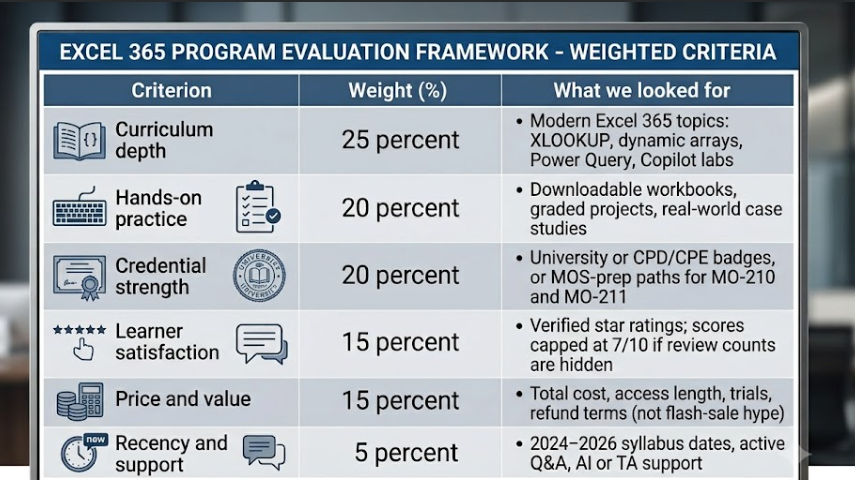
Quality controls: If a course lacked update dates or showed outdated screenshots, we limited its recency score to 6.5. We also docked points when providers hid ratings. No company paid for inclusion; the math alone selected the final nine.
Excel certificate vs. Microsoft certification
Many course pages mix up a provider's certificate and Microsoft's certification. Here's the quick way to tell them apart:
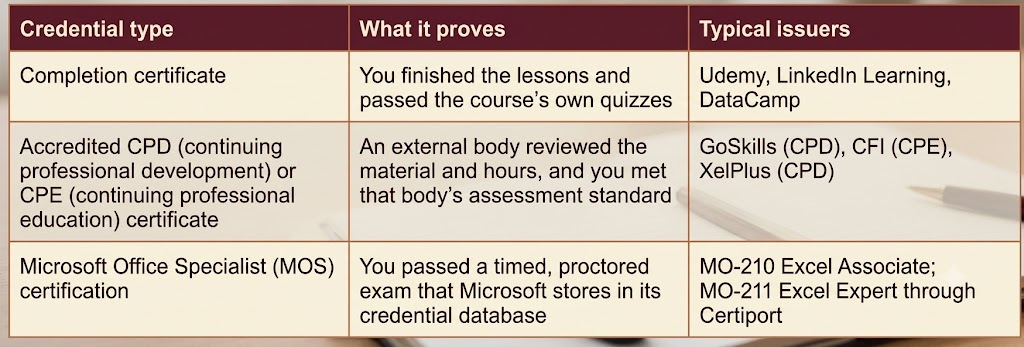
A provider badge looks fine on LinkedIn and can support employer reimbursement, but it never replaces a passed MOS exam on a résumé.
That said, credentials matter far less when you own the company. If you are a founder or an operator, nobody is screening your résumé. The return on a course shows up in a rolling cash-flow forecast you actually trust, a KPI dashboard that refreshes without manual surgery, a monthly report that takes twenty minutes instead of a day, and a pricing decision you can defend with numbers. Certification is worth paying for when a client, an employer, or a licensing body asks for proof. Otherwise, judge a course on the working file it leaves you with.
Quick-scan comparison of the top courses
Need the tl;dr? Use the table below to match each program to your budget, schedule, and learning style. (Prices and ratings were verified August 4, 2026; always confirm at checkout.)
1. GoSkills Microsoft Excel 365: best overall for busy professionals
The official GoSkills Excel 365 course, rated 4.6★ by more than 3,300 learners, shrinks training into coffee-break sessions. Sixty-one bite-size videos (about 5 h 40 m of footage, roughly 26 h with practice) guide you from formatting basics to PivotTables, dynamic arrays, and a starter VBA lesson. Each clip ends with a workbook download and a quiz, so progress feels steady rather than sloggy.
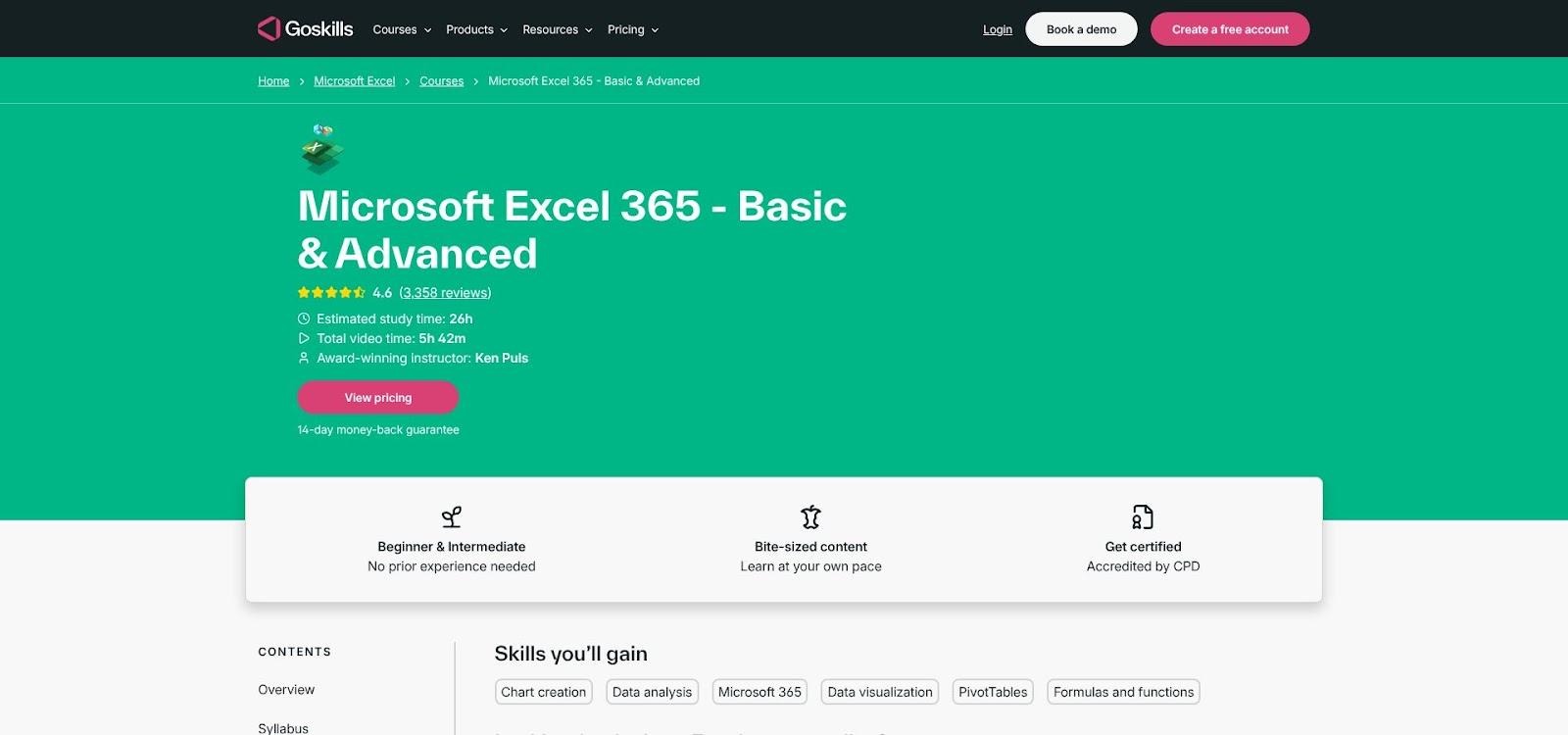
The course was refreshed in July 2026; every screenshot shows Excel 365. New content covers XLOOKUP, LET, and starter Copilot prompts, and Mac shortcuts appear alongside Windows keys.
Complete the modules, earn at least 70 percent on the final quiz, and you receive a CPD-accredited certificate, which is useful for employer reimbursement even though it is not a MOS exam.
Cost snapshot: USD 39 per month or USD 249 per year, with a seven-day free trial and a 14-day money-back window. The subscription also unlocks hundreds of other GoSkills courses, including new additions from its Madecraft partnership such as Power Query, accounting, and Python-in-Excel tracks.
Trade-offs: You lose video access if you cancel, and there is no capstone project for a public portfolio. Still, for founders who need fast, modern skills, GoSkills delivers the most time-efficient path from rusty formulas to reliable dashboards.
2. Microsoft Excel professional certificate: best for Excel plus Copilot
Microsoft's four-course Coursera track targets beginners who want modern skills and an AI safety net. Over roughly 12 weeks (Coursera suggests about seven hours a week, ~80 hours total) you move from formulas and data cleanup to macros, dashboards, and, critically, how to validate Copilot-generated answers instead of accepting them at face value.
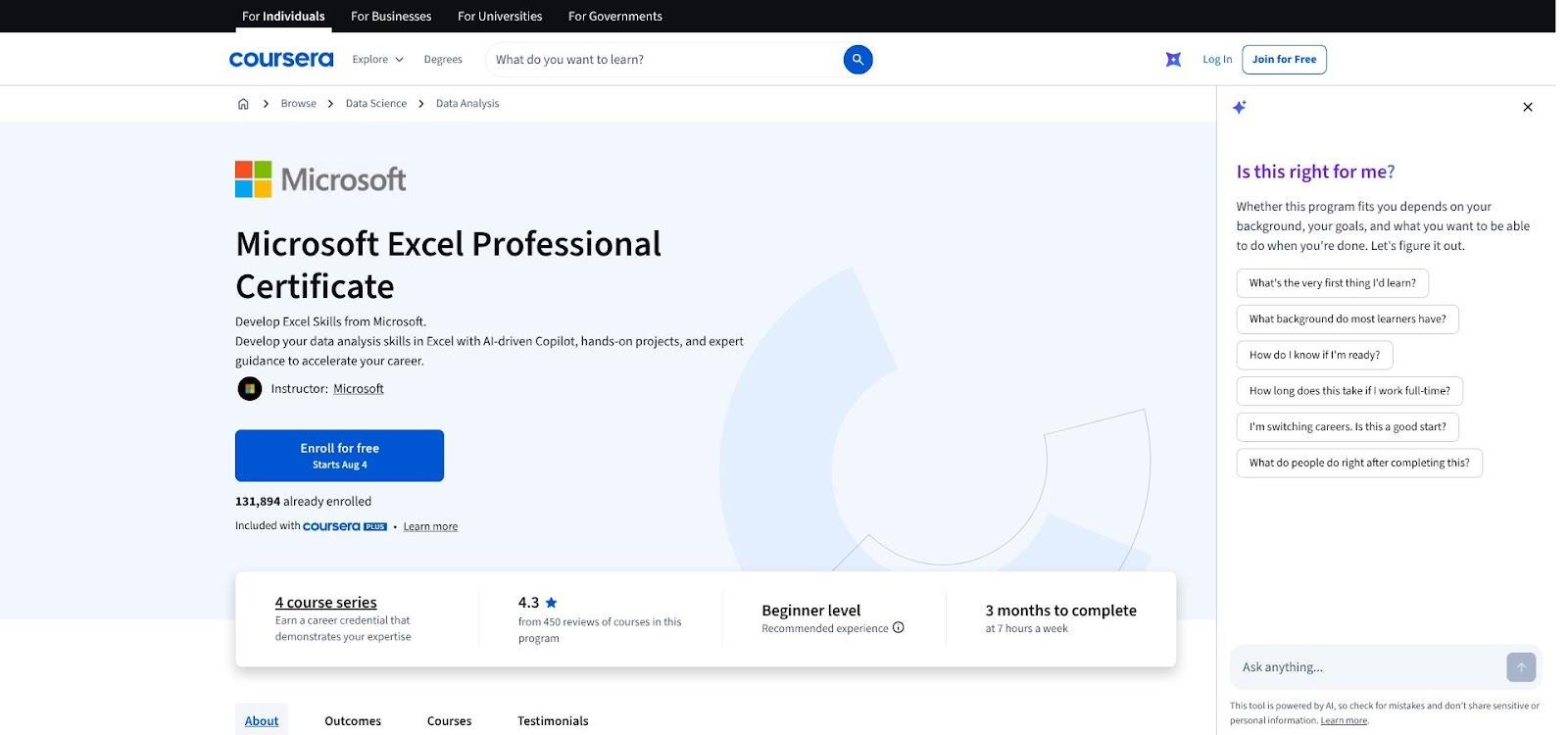
Each module ends with a graded project: attendance trackers, personal budgets, interactive dashboards. Instant feedback pushes you to apply new concepts right away, which helps the lessons stick.
Finish the sequence, pass every assessment, and you earn a Microsoft Professional Certificate with a shareable link. It is not a MOS exam, but the Microsoft logo still carries weight on LinkedIn and reimbursement requests.
Cost snapshot (August 4, 2026): Coursera Plus lists at USD 59 per month in the United States, while a single-course subscription shows USD 49. Prices vary by region, so confirm at checkout. You also need an active Microsoft 365 license for the Copilot labs, so budget for that extra fee if your business has not upgraded yet.
Learner sentiment sits at 4.3★ across about 500 public reviews. Praise centers on the Copilot walkthroughs; the top complaint is time commitment, so block calendar time before you start.
Choose this path if you want Microsoft's own voice guiding you through AI-ready Excel and you are willing to trade speed for depth.
3. XelPlus Excel essentials: best for lifetime access and instructor support
Microsoft MVP Leila Gharani turns her flagship course into on-demand coaching. Eleven hours of focused video pair with downloadable workbooks that mirror real tasks: reconciling accounts, building dynamic dashboards, stress-testing models.
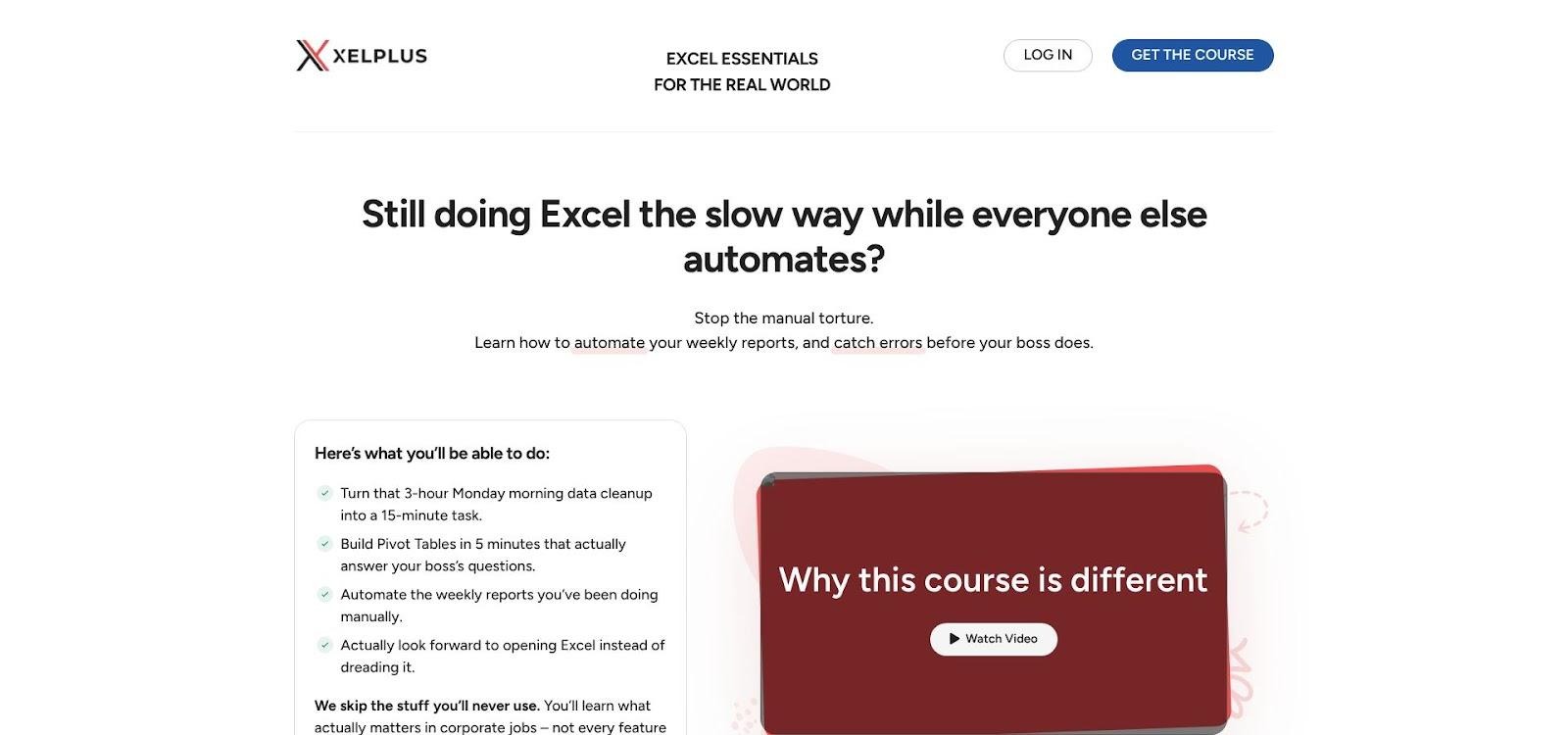
The flow is problem-first: Leila shows the issue, then clicks through the fix while explaining the logic. That narrative style trains you to diagnose new Excel headaches rather than copy steps.
Support sets this course apart. XelPlus promises teaching-assistant replies within one business day, and lifetime access means you catch every 365 update, whether that is TAKE, EXPAND, or whatever Microsoft ships next.
Finish the lessons, score at least 70 percent on the final quiz, and you earn a CPD-accredited Credly badge. It is not MOS, but learners say managers accept it as proof of structured professional development.
Price snapshot (August 4, 2026): USD 149 one-time with a 14-day money-back guarantee. The purchase also unlocks future discounts on PivotTables or Python-in-Excel modules.
Caveats: Most demos run on Windows Excel 365, so Mac shortcuts are patchy. Teachable's mobile app streams smoothly, yet workbook downloads still need a laptop. No public aggregate star rating appears on the landing page, so we capped satisfaction at 7 out of 10 in our scoring.
If you prefer a single payment, human feedback, and evergreen access over an endless subscription, XelPlus offers the strongest depth-plus-support combo on the list.
4. DataCamp Excel fundamentals: best interactive practice
DataCamp trades lecture fatigue for hands-on reps. Each lesson opens a live Excel clone in your browser, scores your work instantly, and explains every mis-click on the spot. Five bite-sized courses total about 16 hours, moving from cell references to PivotTables and scenario analysis, then capping with a customer-churn case study that ties formulas, charts, and narrative insight together.
Gamified XP, skill assessments, and a streak counter keep momentum high, turning airport waits into nested-IF drills.
Finish the track and you receive a statement of accomplishment. It is learning proof, not résumé gold, yet hiring managers still like seeing dozens of graded challenges instead of autoplayed videos.
Price snapshot (August 4, 2026): DataCamp lists an annual plan at USD 14 per month. Subscriptions are not prorated, so set a one-month sprint, finish the track, and cancel if Excel is all you need.
Limitations: VBA, advanced Power Query, and finance modeling live in separate tracks, and Mac shortcuts appear less often than Windows keys. Still, for tactile learners who crave rapid-fire feedback, DataCamp offers the stickiest practice environment on this list.
5. Udemy (Kyle Pew): best budget all-in-one
Kyle Pew's Udemy course packs nearly 19 hours of video into a single, low-cost purchase. Lifetime access lets you replay lessons on desktop, phone, or the Udemy TV app, even offline on a redeye flight. The syllabus starts with formatting basics, moves through PivotTables, then dives into macros, VBA, and a taste of Power Pivot; each module ends with a project workbook that grounds the feature in real data.
Price snapshot (August 4, 2026): List USD 129, but Udemy discounts it below USD 20 most weeks. More than 534,000 ratings average 4.7★, and the Q&A forum still sees new answers daily.
Trade-offs: Mixed-version footage shows Excel 2013 next to 365; the 2026 update adds XLOOKUP and dynamic arrays, yet ribbon déjà vu remains. The certificate is a simple PDF, so use it as a conversation starter and pair it with a polished portfolio file.
Refund policy is generous only early on: watch under one-third of the content and request within 30 days, or Udemy may decline. Sample the intro, decide quickly, and commit or move on.
When money is tight and you want beginner formulas through basic automation in one purchase, this course delivers the most hours per dollar. Just stay alert to interface shifts and lean on the projects to cement new skills.
6. CFI Excel learning path: best for finance and FP&A
Corporate Finance Institute (CFI) builds its Excel path for board-ready modeling, not marketing dashboards. The anchor course, Excel Fundamentals: Formulas for Finance, runs about 3.5 hours; a wider track then layers Power Query, PivotTables, sensitivity analysis, and full three-statement modeling.
Finance is the lens throughout: live ticker data, working-capital schedules, and LBO debt waterfalls replace generic sales tables. Each lesson ends with a graded model, and you must score at least 80 percent to pass.
Credentials matter here. Pass the assessments and you earn 3.5 NASBA CPE credits, stored in an Accredible wallet for easy sharing, which is ideal if you maintain a CPA license.
Cost snapshot (August 4, 2026): A self-study membership lists at USD 397.60 per year, and CFI's policy offers no refunds. That fee unlocks the full library: Excel-powered valuation, Power BI dashboards, and the financial-modeling boot camp. Higher tiers add expert model reviews and career coaching.
Skip CFI if you only need cleaner inventory forecasts; choose it if debt covenants, board decks, and CPE compliance define your day. It is the most concentrated Excel-for-finance toolkit in our top nine.
7. Macquarie Excel skills for business: best university-led curriculum
Macquarie University's four-course specialization is Coursera's most-reviewed Excel path: about 64,000 public ratings average 4.9★ (verified August 4, 2026). That crowd signals consistent quality and a peer forum quick to answer niche questions.
The sequence moves from absolute beginner to advanced analysis in three to six months. Weekly graded assignments make you clean messy exports, build dynamic dashboards, and explain findings in plain English, with no half-watched lectures allowed.
Trade-offs exist. Screenshots still show Excel 2016, and Mac shortcuts often sit in footnotes. Yet the core skills of logical functions, PivotTables, and Power Query carry straight into Excel 365. Some learners even say the older ribbon clarifies what changed when they upgrade.
Finish every task and Coursera issues a shareable Macquarie certificate. It is not a MOS badge, but the university name still carries weight and can satisfy CPD hours.
Cost snapshot (August 4, 2026): Coursera Plus lists at USD 59 per month, and individual-course plans show USD 49. Because the track runs several months, block calendar time in advance so subscription costs stay in check.
Choose Macquarie if you want university-grade structure and do not mind trading a modern UI for rigorous, feedback-driven coursework.
8. UBC "Excel for everyone": best academic data-analysis certificate
The University of British Columbia's three-course edX series turns messy data into dashboard stories without coding. Over about five months you progress from tables and conditional formulas to Power Query, scenario modeling, and storytelling dashboards, each capped by a graded business case that fixes real datasets.
Pacing feels academic: short theory clips, quick quizzes, then a larger weekly assignment you can revise until you pass. That iterate-until-right loop is a gift for hands-on learners.
Finish every assessment and you earn a UBC Professional Certificate with a verifiable link. Hiring managers recognize the university seal, making this badge stronger than a generic "course completed" PDF.
Cost snapshot (August 4, 2026): The full bundle lists at USD 567, discounted to USD 510.30 during our check. edX offers no refunds after the drop date, so confirm workload before paying.
Caveats: The public syllabus shows no 2025–2026 refresh, and screenshots appear to use Office 2021. Still, XLOOKUP, dynamic arrays, and Power Query are covered, so functional gaps are minor.
Choose UBC if you value a university-branded credential and learn best through structured, data-driven projects. Just be ready for the higher price and a slightly older interface.
9. LinkedIn Learning "Build your Excel skills": best quick workplace refresher
Need a pre-meeting tune-up, not a semester-long course? LinkedIn Learning's three-course path delivers about 11 hours of targeted practice. The anchor is Christopher Dutton's Excel Essential Training (released February 24, 2025), supported by short modules on data management and macros. Each lesson includes an exercise file you can edit and then compare to the finished workbook.
Progress feels social: finish a chapter quiz and LinkedIn adds a mini celebration banner, and the completion badge drops into your Skills section with one click.
Limits are clear. The two supporting courses date from 2022–2023, and there is no capstone project. If you need deep analysis or finance modeling, choose an option higher up this list. For office pros on a deadline, though, the tight scope and one-month free trial make this the fastest route from rusty formulas to ready-for-Monday execution.
Cost snapshot (August 4, 2026): LinkedIn Learning lists USD 39.99 per month after the trial, but many employers and public libraries cover the fee, which can drop your cost to zero.
Paid vs. free Excel courses: which route fits your goal?
Price is the first filter many learners apply, yet cost alone rarely tells the full story. Free YouTube playlists deliver quick wins, while structured paid programs add accountability and stronger proof of completion.
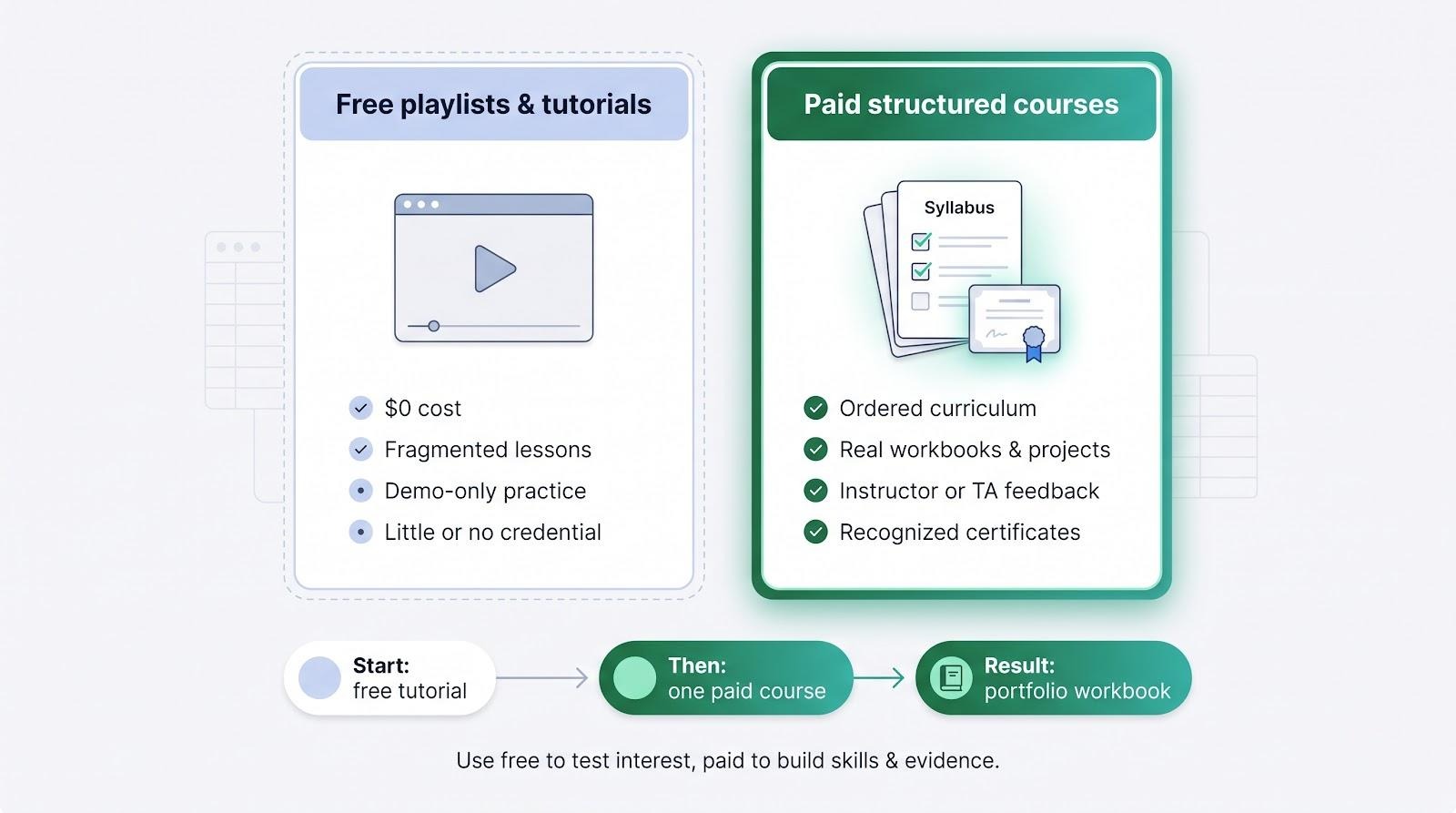
A 2026 Forbes Advisor roundup notes that "free" certificates often vanish at checkout or carry little hiring weight.
A sensible path:
- Start with a free tutorial to confirm you enjoy spreadsheets.
- Choose one paid course aligned to a business outcome you owe someone, and finish it within a set window.
- Build a portfolio workbook (cash-flow model, KPI dashboard, or inventory tracker) to prove real output.
Think of paid courses as accelerators, not crutches. The credential opens doors, but the workbook you can share tonight is what closes the deal.
2026 Excel learning trends every course should cover
- AI literacy has gone mainstream. LinkedIn's September 2025 labor-market update found job posts demanding AI-ready skills up more than 70 percent year over year. Modern courses weave Copilot prompts into lessons and, critically, teach you to audit the formulas Copilot suggests.
- The Microsoft certification path is new. Current exams are MO-210 (Excel Associate) and MO-211 (Excel Expert), both tied to Microsoft 365. A syllabus that still advertises MO-201 is teaching Office 2019 history.
- Advanced Excel now means a stack. Expect Power Query for cleanup, Power Pivot/DAX for modeling, dynamic-array functions for cleaner formulas, and Python in Excel for heavy analysis. Together, they turn Excel into a lightweight BI tool that hands off cleanly to Power BI.
Scan any course outline for these three signposts; their presence signals an instructor who teaches today's market, not last decade's ribbon.
How to choose the right Excel course for you
- Start with the workbook you will ship.
- Founder: live cash-flow model
- Agency owner: retainer profitability and utilisation tracker
- Operations manager: KPI dashboard that refreshes without manual rebuilds
- Marketing lead: campaign performance and spend report
- No-code builder: the reconciliation layer your Airtable and Zapier flows feed
The end file tells you whether you need interactive labs, a graded capstone, or case-study models.
- Match the course to your level.
Still merging cells for layout? Nail SUMIFS, XLOOKUP, and tables before chasing VBA or Python. - Check version compatibility.
Excel 365 for Windows has the widest feature set. If you are on Mac or the web app, be sure the provider flags any gaps. - Probe practice depth.
Look for at least one downloadable workbook per module and a final project that ties concepts together. Quizzes test vocabulary; files test thinking. - Weigh the credential against the outcome.
- Running your own business: skip the badge and judge the course on the forecast, dashboard, or report you can build afterwards.
- Employer reimbursement: CPD, CPE, or university credit
- Résumé signaling: MOS MO-210 or MO-211 (exam vouchers cost about USD 120)
- Calculate total cost.
Subscriptions seem cheap until you slip past the deadline; one-time fees hurt up front but grant lifetime access. Add the price of Microsoft 365 or Copilot if you do not already have them. - Assess support.
Active instructor Q&A, teaching assistants, or peer forums trim troubleshooting time. An AI tutor is a bonus, not a replacement for human help.
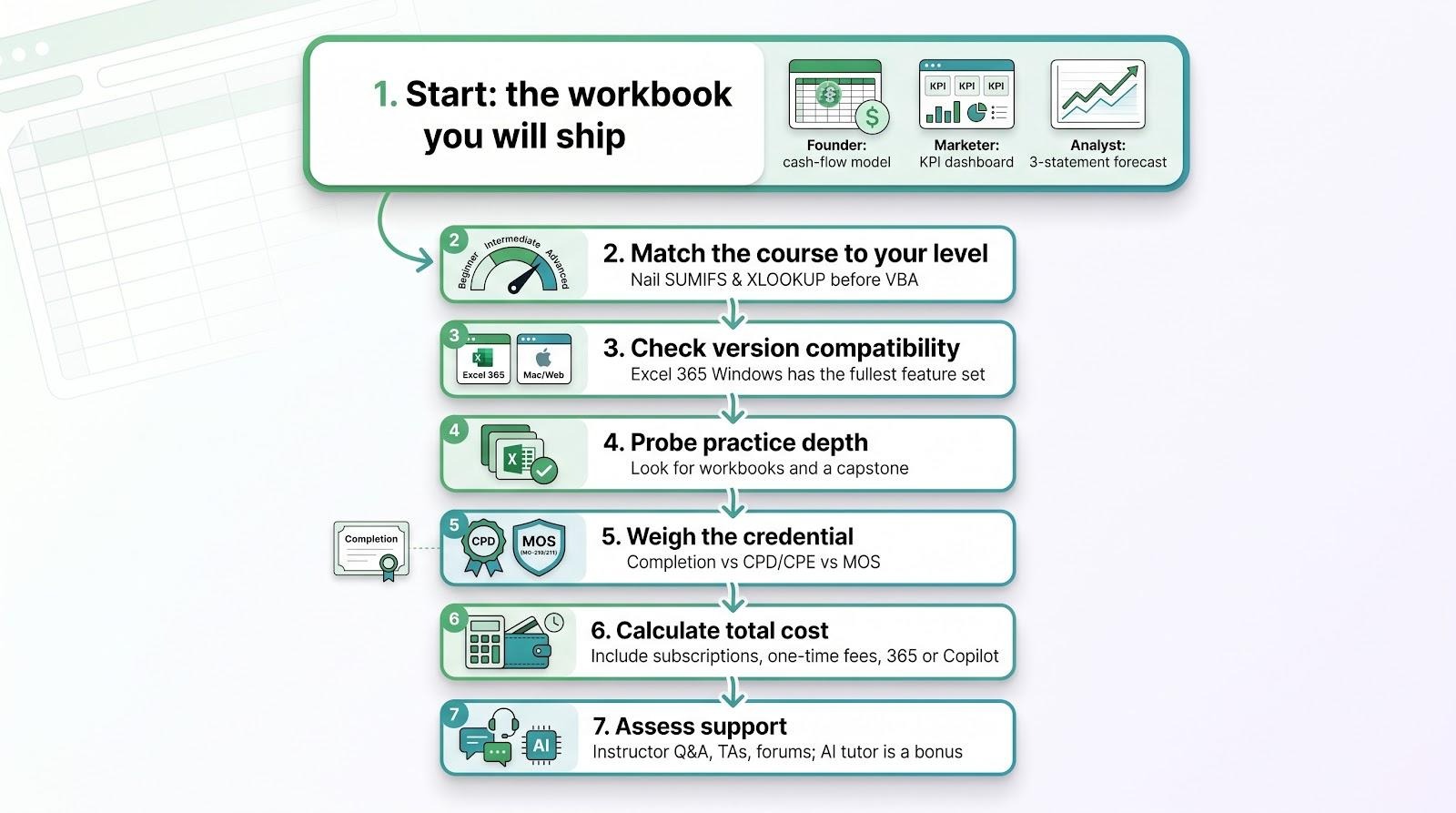
Filter courses through these checkpoints and the best option is simply the one that delivers your next business result on schedule and within budget.
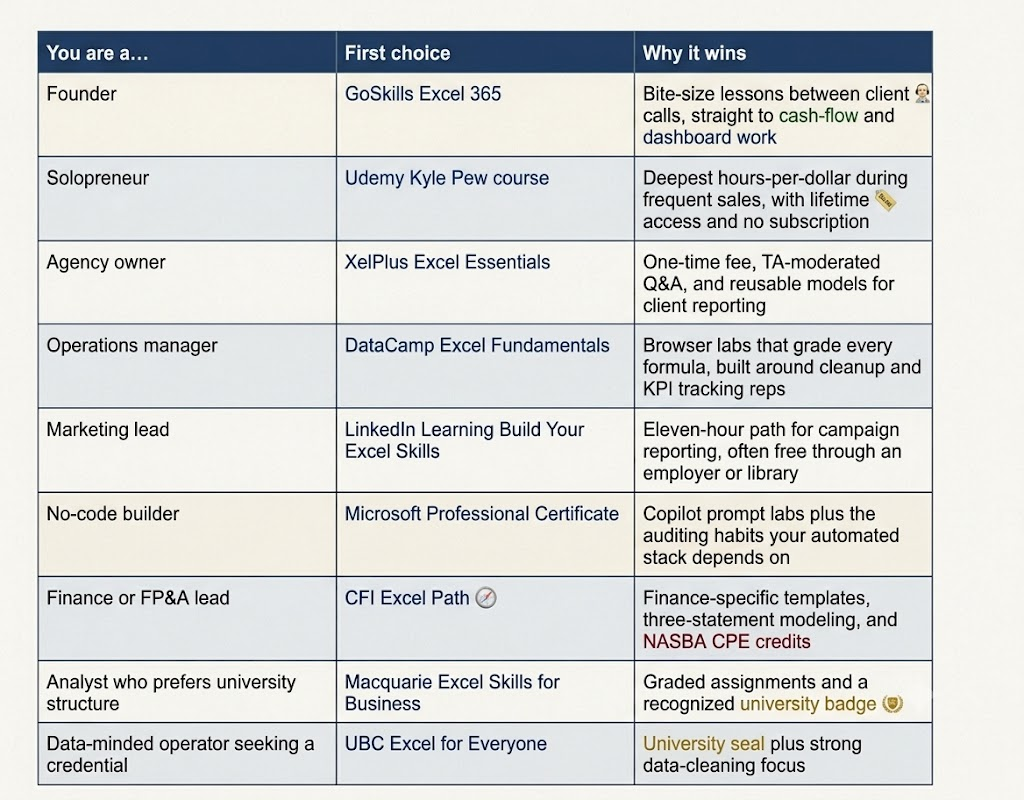
Quick picks by role and goal
Still torn? Find your role below and start there.
Frequently asked questions
What is the best Excel course online for complete beginners?
For sheer approachability, GoSkills and DataCamp top the list. GoSkills uses five-minute videos you can fit between meetings, while DataCamp throws you straight into interactive labs that grade every click. Pick GoSkills if you like to pause and rewind; choose DataCamp if you learn fastest by doing.
Which Excel certification carries the most weight with employers?
Microsoft's MOS exams, MO-210 for core Excel and MO-211 for Excel Expert, remain the gold standard. Course completion certificates are useful learning proof, but recruiters treat a passed MOS exam as objective evidence of skill. If you run your own business, neither matters as much as the model you can build.
How long does it take to become proficient in Excel?
Expect four to six focused weeks to cover modern fundamentals such as tables, XLOOKUP, and PivotTables, assuming you practice three hours a week. Advanced automation and modelling can stretch to several months because mastery only comes from building real projects.
Should I learn Power Query, VBA, or Copilot first?
Start with Power Query for recurring data cleanup; it saves hours fast. Add Copilot once you know what "good" formulas look like, so you can audit AI suggestions. Reserve VBA for legacy automation or niche power-user needs.
Do I still need Excel if my business runs on Airtable, Notion, and Zapier?
Yes, and usually more than you expect. Those tools capture and move records well, but reconciling mismatched exports, modelling scenarios, and pressure-testing assumptions still land in a spreadsheet. Excel is the analysis layer your no-code stack feeds.
Can Mac users take these Excel courses?
Yes, but parity varies. GoSkills, DataCamp, and Macquarie flag Mac differences inside lessons. XelPlus and Udemy lean Windows-first, especially in VBA sections. Always check sample videos before enrolling.
Do I need Microsoft 365 to follow modern courses?
Strongly recommended. New functions like XLOOKUP and dynamic arrays only exist in 365 or Office 2021. Copilot labs also require an active 365 licence.
What project should I build after finishing a course?
Three crowd-pleasers: a rolling cash-flow forecast for founders, a marketing KPI dashboard that auto-refreshes, or an inventory reorder tracker with Power Query connections. Each proves you can link multiple Excel concepts into a business outcome.
Is Excel still worth learning in 2026?
Absolutely. AI accelerates formula writing but raises the bar for validation and storytelling. Employers and clients now expect you to sanity-check Copilot output and turn raw data into decisions. Solid Excel skills make that leap possible.
Conclusion
The right Excel course is not the cheapest one, and for most people reading this it is not the one with the most impressive certificate either. It is the one that gets a specific number off your worry list: a forecast you trust, a KPI dashboard that refreshes itself, a monthly report that stops eating a full day.
If you run the business, start with GoSkills and work in short sessions between calls. If you bill clients, XelPlus gives you models worth reusing across accounts. If finance is the job, CFI is the concentrated option. And if your stack already runs on Airtable, Notion, and Zapier, the Microsoft path pairs Copilot fluency with the auditing habit that keeps automated numbers honest.
Pick one, block the calendar time, and finish it. Then build the workbook you have been putting off. That file, not the badge, is what changes how you run the month.